Category: Insights

  • Scaling Up: The benefits of leasing versus owning equipment in the modern market

    Conceptual compass with needle pointing the word lease. Concept of choosing between buying, renting or leasing a car or an equipment. 3D illustration

    By: Stefanie Galeano-Zalutko

    The awards and personalization industry is expanding quickly in both size and scope, exposing transitional hurdles like operational complexity and productivity strain along the way. As both new and veteran businesses face diverse financial challenges amid mounting pressure, they are turning to lenders for support. 

    With the cost of essential operating equipment on the rise, the Equipment Leasing and Finance Association (ELFA) says that approximately 82% of U.S. companies rely on some form of funding—whether loans, leases, or lines of credit—to make necessary business investments. The equipment leasing and finance industry continues to grow, with Allied Market Research projecting it to rise from $1.2 trillion in 2022 to $3.1 trillion in 2032. 

    Texas-based Ascentium Capital offers a unique combination of bank-grade cost of capital and fintech-level execution. As a division of Regions Bank, qualified Ascentium customers benefit from true bank pricing, stability, and balance sheet strength rather than higher-cost nonbank capital. 

    “At the same time, Ascentium operates on a modern equipment-finance-specific technology platform. This allows retailers to access bank capital without traditional bank friction,” says Craig Colling, senior vice president and core vendor channel leader at Ascentium Capital. 

    While traditional banking institutions account for the lion’s share of equipment financing and business funding at 55% to 65%, independent and specialty lenders continue to rise in popularity. This is especially true as the financial landscape evolves rapidly in response to market shifts and customer needs.

    According to Carey Kroll, senior account manager at Geneva Capital LLC, specialized equipment-financing companies (like Geneva) focus on funding initiatives in niche industries and tend to cover more ground than traditional banks, from loans and leases to start-up and working capital. Like other lenders, the company serves businesses of all shapes and sizes, from home-based start-ups to large-scale manufacturers, with fewer restrictions. 

    “Banks are not in the business of taking excessive risks. As such, their programs are subject to change as economic conditions falter. For example, as the Federal Reserve raises or lowers the prime rate, interest rates will increase or decrease, impacting your business outside of your control,” says Kroll.

    “The opposite is true for leasing companies—they take 100% of the interest rate risk. Therefore, the payment on your lease will never change during its term, regardless of interest rates and inflation,” she continues. 

    In the following Q&A, Colling and Kroll share their insights on leasing and owning equipment. 

    Q: What are the pros and cons of leasing equipment? 

    Colling: The value of leasing lies in alignment, not convenience. Leasing preserves capital, aligns cost with useful life and revenue, enhances flexibility, and often provides tax and accounting benefits. On the contrary, leasing requires clear understanding of structure and end-of-term options. Take into consideration there are potentially higher total costs if flexibility is not needed.

    Q: What’s the biggest difference between leasing and owning equipment for a retailer new to the decision? Is it more beneficial for a business to own or lease equipment? 

    Kroll: There is no right answer that universally applies to all customers, as it’s dependent on individual circumstances. With both lease and loan options, the process, cost, and terms are [relatively] the same. It’s really a slight tweak to the structure that helps customers determine how to write off the equipment for income tax purposes. Leasing has a lower monthly payment because of the final balloon payment deferred to the end of the term, while a loan has a slightly higher monthly payment because there is no payment deferred to the end. Lease options allow the business to write off monthly payments as a rental or operating expense. In contrast, traditional financing allows the full cost of the equipment to be written off during the year it’s acquired via depreciation, or Section 179. We recommend consulting with a trusted tax adviser to determine which route is best for one’s unique situation.

    Q: How important is it to understand a lease structure from a tax and accounting perspective?

    Colling: It’s extremely important. Different structures affect expense recognition, balance sheet, and tax treatment. Retailers should understand how a structure benefits their business from both a cash flow and accounting perspective, and confirm details with their accountant before committing.

    Q: What business situations or goals most often point toward leasing rather than buying?  

    Colling: Leasing is most appropriate when a business is focused on preserving cash, managing risk, and maintaining flexibility. It tends to align well when the useful life of the equipment matches a defined revenue period, especially in technology-driven environments where upgrades are expected every few years. Leasing allows businesses to align equipment costs with the revenue the equipment generates, rather than tying up capital in assets that may lose competitive value before they are fully depreciated.

    Kroll: Leasing is especially popular among start-ups and those with tight cash flow because payments are lower. It’s also great for more established businesses that need write-offs but aren’t able to take the full write-off in the year of purchase.

    Q: How should order volume and job frequency factor into the lease-or-buy decision?

    Colling: Order volume and job frequency are key drivers of return on investment. High-utilization equipment that produces consistent revenue can justify longer-term ownership structures, such as loans or capital leases, when the useful life of the equipment comfortably exceeds the financing term. For lower or more variable workloads, leasing often provides better alignment between payments and revenue cycles, reducing downside risk.

    Q: What role should projected growth play in deciding whether to lease or own?

    Colling: Projected growth should heavily influence financing structure. Growth introduces uncertainty; therefore, flexibility becomes valuable. Leasing or shorter-term structures help prevent businesses from being locked into capacity, technology, or payment obligations that no longer fit as the business evolves. Financing should support where the business is going, not constrain it.

    Q: What signs suggest a retailer is in a strong position to purchase equipment outright?  

    Colling: Retailers are generally well-positioned to purchase outright when they have excess liquidity beyond operating and growth needs; predictable, stable cash flows; and equipment with a long useful life and low technology risk. Even in these scenarios, many businesses still choose bank-backed loans over cash purchases to preserve capital and optimize returns.

    Q: How do cash flow, working capital, and inventory needs affect the right financing choice?  

    Kroll: If a business is turning away customers or outsourcing a lot, production can’t keep up with orders, or lead times are getting longer, then it’s definitely time to consider a purchase—whether that’s via cash or financing.

    Colling: Cash flow management is central to the lease-versus-buy decision. Equipment competes with inventory, payroll, and growth initiatives for capital. Financing allows businesses to preserve working capital, smooth cash outflows, and maintain liquidity during seasonal or variable periods. Cost of capital is paramount. Bank-owned lenders typically offer meaningfully better rates and terms than brokers or independents, which directly benefits cash flow over the life of the agreement.

    Q: Does leasing equipment make sense for retailers who need frequent upgrades?  

    Colling: In personalization, technology is often the competitive edge. Leasing makes sense when equipment innovation directly improves speed, quality, or capability; customer demand drives ongoing upgrades; and competitive advantage depends on staying current. Leasing converts rapid innovation cycles into predictable operating costs rather than stranded capital investments.

    Kroll: Lease financing is a good option for equipment that frequently needs to be updated, as the return option at the end of the term can make the process easier and reduce costs. It’s important to select a term that does not exceed the equipment’s life.

    Q: What is covered during a lease, especially as it relates to equipment maintenance and repair?  

    Kroll: All maintenance and repairs are handled by the user and not covered by the financing. No different from car repairs and maintenance being your responsibility rather than the lender’s. Any warranty that comes with the purchase of equipment will still be valid when the equipment is financed.

    Q: When it comes time for businesses to consider loans versus leases, what differentiates business models like yours from traditional banks?

    Colling: There are three core differentiators. First, customers benefit from Regions Bank’s balance sheet, which is critical to long-term cash flow. In addition, Ascentium has technology-driven speed and experience. The company was a technology-forward platform prior to the bank acquisition, and Regions Bank has continued to invest heavily since. Results include the most approvals in under four hours, approval to documents in minutes, application to funding often in hours or less than one business day, and industry-leading application-only limits (no financial or bank statement requirement), up to $500,000, depending on the equipment supplier/assets being financed. Moreover, Ascentium has deep manufacturer and dealer partnerships, which enable special financing programs that improve close rates and customer outcomes.

    Kroll: Flexibility in terms is a big draw. The primary concern of a bank is to protect its interests, which is why most require 10% to 20% down to finance business equipment. On the contrary, a leasing company’s main goal is to generate cash flow, so they are highly creative in finding the easiest way for a business to get new equipment. In addition, banks have a lending threshold with each borrower. If you get into a certain amount of debt that the bank deems a risk, they may choose to end business with you or refuse financing. While leasing companies must deal with this as well, they only consider the equipment finances for that customer [in the approval process]. So, you can retain access to capital with your bank without tying up credit lines. Another consideration is that when a business chooses financing with Geneva Capital, our company files a UCC Financing Statement Amendment with the Secretary of State, indicating the customer’s location and that the leasing company owns the equipment. We designate only the new equipment as collateral. Other lenders will see that only the leased equipment is under consideration and will still be willing to work with you. In comparison, under a traditional bank loan, all property is stated—the new equipment plus your entire business. With this blanket UCC in place, other banks will not be willing to provide overlapping financing to you.

    Q: Why does working with an industry-specific lender matter?

    Colling: Lenders that understand the industry and partner with manufacturers and dealers can offer preferred or promotional financing programs, deferred payment options, seasonal or step-up payment structures, and prepayment to the equipment seller before the equipment is shipped or installed. These programs exist because the lender understands equipment life cycles, margins, and operating realities within the industry.

    Q: What are some key things a retailer should ask a lender before signing a lease or financing agreement? 

    Kroll: What does the application process look like, and how long does it take? What terms can I expect? Will it be a hard or soft credit pull? Will this show up on my personal credit report?  

    Colling: Understanding the full economic picture, not just the monthly payment, is essential. Retailers should ask if it’s a lease or a loan and how ownership works at the end. What assumptions are being made about the equipment’s useful life? Are there required down payments? What is the rate/cost of capital for the full term? If it is a lease agreement, what is the residual structure, how is it calculated, and what residual options are available? What documentation or origination fees apply? Is there interim rent being charged between funding and when my first payment is due, and how is this charge calculated? Are there early-payoff or prepayment penalties?

    Q: Is your clientele comprised of small, medium, or large businesses? 

    Kroll: We’ve worked alongside businesses of all shapes and sizes, from small, home-based mom-and-pop shops to Fortune 500s, nonprofits, and universities. 

    Q: Are most businesses new ventures or established ones? 

    Kroll: We work with brand-new companies and businesses that have been around for over 100 years! In 2025, 30% of our customers had been in business for less than two years.

    Q: Do certain-sized businesses finance equipment more often than others?

    Colling: Yes, but for different reasons. Small businesses finance to conserve cash and manage risk. Midsized businesses finance to optimize cash flow and capital efficiency. Large businesses finance because it’s often the most disciplined capital-allocation strategy. Across all sizes, financing has become an intentional financial decision, not a reactive one.

    The most successful retailers focus on the cost of capital, flexibility, speed to funding, and alignment with useful life and growth. Ascentium’s model, bank-backed capital paired with a high-performance technology platform, was designed specifically to support equipment-driven businesses at every stage of growth.

    Q: What changes have you seen during the past three to five years impacting financing in the awards and personalization industry?

    Colling: Over the past several years, we’ve seen shorter technology life cycles; more frequent, smaller equipment purchases; increased demand for payment flexibility; and greater use of deferred and seasonal payment plans. Retailers are financing more strategically—not just out of necessity.

    Q: With current inflation and interest rates, how does that impact business decision-making in financing/leasing necessary equipment?  

    Kroll: The last five to six years have been tumultuous for several reasons: COVID-19, inflation, tariffs, administration and policy changes—the list goes on and on. I think more than ever, these changes point to financing as a valuable resource for businesses, as it allows them to grow while keeping cash on hand for unexpected expenses. The interest rate topic has calmed over the last year as we’ve seen slight decreases in the prime rate, but it’s important to remember that the rates we’re seeing right now are quite low by historical standards. 

    Colling: Higher cost of funds has increased focus on the cost of capital, payment predictability, and flexibility. Well-structured, bank-backed financing still supports growth, particularly when new equipment generates revenue quickly and improves margins. 
  • Printing Possibilities with Mutoh

    How the printing technology innovator is continuing to meet modern demands

    By Mike Clark

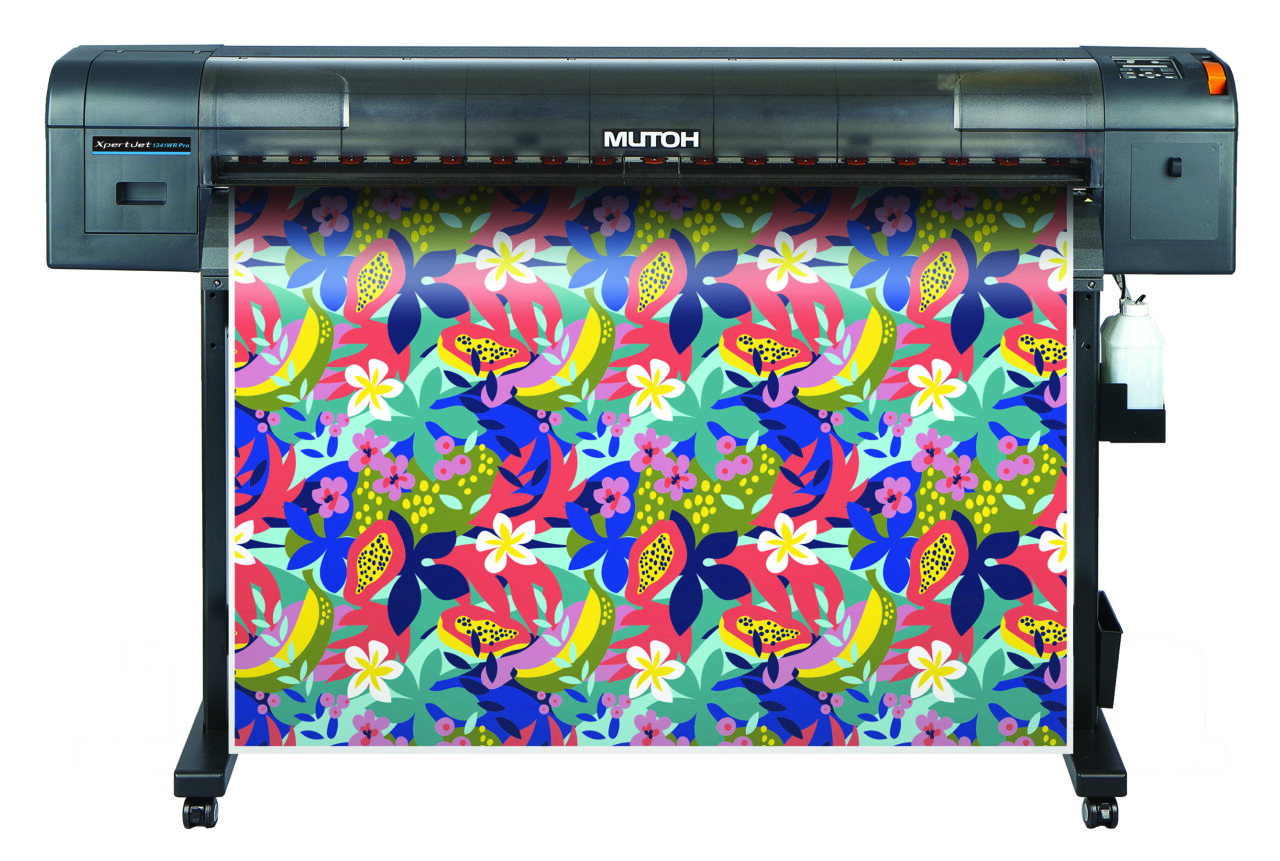
    For more than 70 years, MUTOH America has offered print providers the ability to adapt to changing markets through cutting-edge technology and application-driven innovation. 

    For forward-thinking businesses, that means refining and iterating on equipment that delivers high-quality output and supports new revenue streams and shorter turnaround times. 

    That commitment to innovation has shaped the MUTOH evolution over the years, including the launch of the ValueJet series in the early 2000s and the XpertJet line. 

    “The XpertJet 661UF was an instant success due to its outstanding ability to produce ADA-compliant signage,” says Emilio Rangel, product manager at MUTOH America. 

    More recently, the HydrAton 1642 provided printers with capabilities for sustainable water-based printing.

    Each step and new product release has reflected the same goal: to provide tools and equipment that are practical, dependable, and ready to meet the demands of print businesses.

    For retailers specializing in promotional products, signage, and awards, attention to market demand matters. There’s a continued need for short-run production, customized items, and specialty effects that help businesses stand out from commodity print providers. 

    “At the same time, shops are looking for equipment that can handle multiple applications without adding complexity to their workflows,” says Rangel. 

    Designed for Growth

    Rangel highlights how the combination of MUTOH product offerings and unique features helps address several needs of modern retailers. 

    “MUTOH UV printers, including models like the XpertJet 661UF and 1462UF, are well-positioned for these trends by allowing users to produce signage, promotional products, awards, ADA signage, and personalized items all on a single platform with strong adhesion and high image quality,” he notes. 

    Other thoughtful features, such as UV Local Dimming Control Technology, which allows users to print CMYK and gloss in one pass easily, simplify the process of embellishing their products. Rangel also points to Spot Lenticular, an advanced graphic technique that applies a glossy, transparent lenticular-lens effect to specific, targeted areas of a print, as a way for printers to create impressive effects on anything under 5.9 inches.

    Turning a Printer into an Asset

    For most businesses, consistent output is what turns a good printer into a business asset. MUTOH has long emphasized manufacturing quality, and its products prioritize repeatable results and user-friendly operation. 

    Rangel says that such reliability and minimal workflow disruption are crucial for retailers managing short-turn orders, multiple substrates, and mixed production methods.

    “Customers trust our products because they are manufactured to some of the highest standards,” he says. “Our constant strive for innovation also means that we are introducing features in terms of printer technology and workflow that focus on providing premium levels of quality.”

    In short, retailers can focus more on production and spend less time on troubleshooting. 

    MUTOH UV technologies also support a safer and more environmentally friendly production environment. 

    “Our water-based ink for the HydrAton 1642 has no SVHCs or GHS hazard symbols, as well as half the VOC content of latex,” Rangel points out. 

    Fewer volatile chemicals mean shops can run more environmentally conscious businesses and safer workplaces. 

    Support for the Long Term 

    Equally crucial to meeting modern demands for retailers is the support that accompanies any equipment investment. MUTOH provides customers with a library of learning content, how-to resources, and application guidance designed to help users build confidence as they move into new print categories. 

    For retailers in more specialized markets, there’s also robust video and instructional content on a broad range of products and industries. Specialized education includes key categories such as braille, color management, and dye sublimation, as well as vehicle wraps and wallpaper. 

    “We also provide all new users with the StartRight Kit 3.0, which is a training tool kit that walks them through how to produce several key applications, complete with blanks and printed samples,” says Rangel. 

    Shifting Demands 

    Looking ahead, Rangel says the biggest opportunity for retailers in 2026 lies in personalization, premium finishing, and short-run specialty work. 

    “Customers increasingly want custom products, textured effects, ADA-compliant signage, direct-to-object printing, and premium embellishments like spot varnish and layered finishes,” he suggests. 

    MUTOH UV platforms, including the XpertJet 661UF and 1462UF, are positioned to help businesses capitalize on those expectations with precise color output, durable substrate adhesion, and the versatility to handle a wide range of applications.

    That versatility extends to categories such as awards, promotional items, and ADA-compliant signage, where both precision and presentation matter.

    Rangel points out that there’s still a strong opportunity in these segments because businesses want a single production solution that can keep pace with shifting customer demands while preserving quality and efficiency. 

    “We are excited about what the future holds here at MUTOH and will continue to be one of the leaders in the industry when it comes to manufacturing reliable, user-friendly, and innovative products.”

  • Three Favorite AI  Tools in Photoshop

    Looking for a new read that may give you some tips for business and life? A few APA members share books that inspired. 

    By Shon Roti

    AI

     impacts nearly everything we consume and create, and there are no signs of it slowing down. Graphic design and design software are increasingly shaped by AI-driven tools. 

    My own resistance to using AI in daily design work has gradually faded as I have become more aware of its practical benefits and time-saving capabilities, while also coming to terms with my initial concerns about what it might mean for my relevance as a marketing professional.

    AI in Photoshop 

    Currently, there are more than 25 AI-powered features and tools in Adobe Photoshop, plus at least 20 machine-learning-assisted functions. Their purposes include adding or extending scenery; removing, adding, or selecting people or objects; retouching skin blemishes; restoring photos; and adjusting lighting, to name a few.

    Here’s a look at a few AI features I often use to save time. 

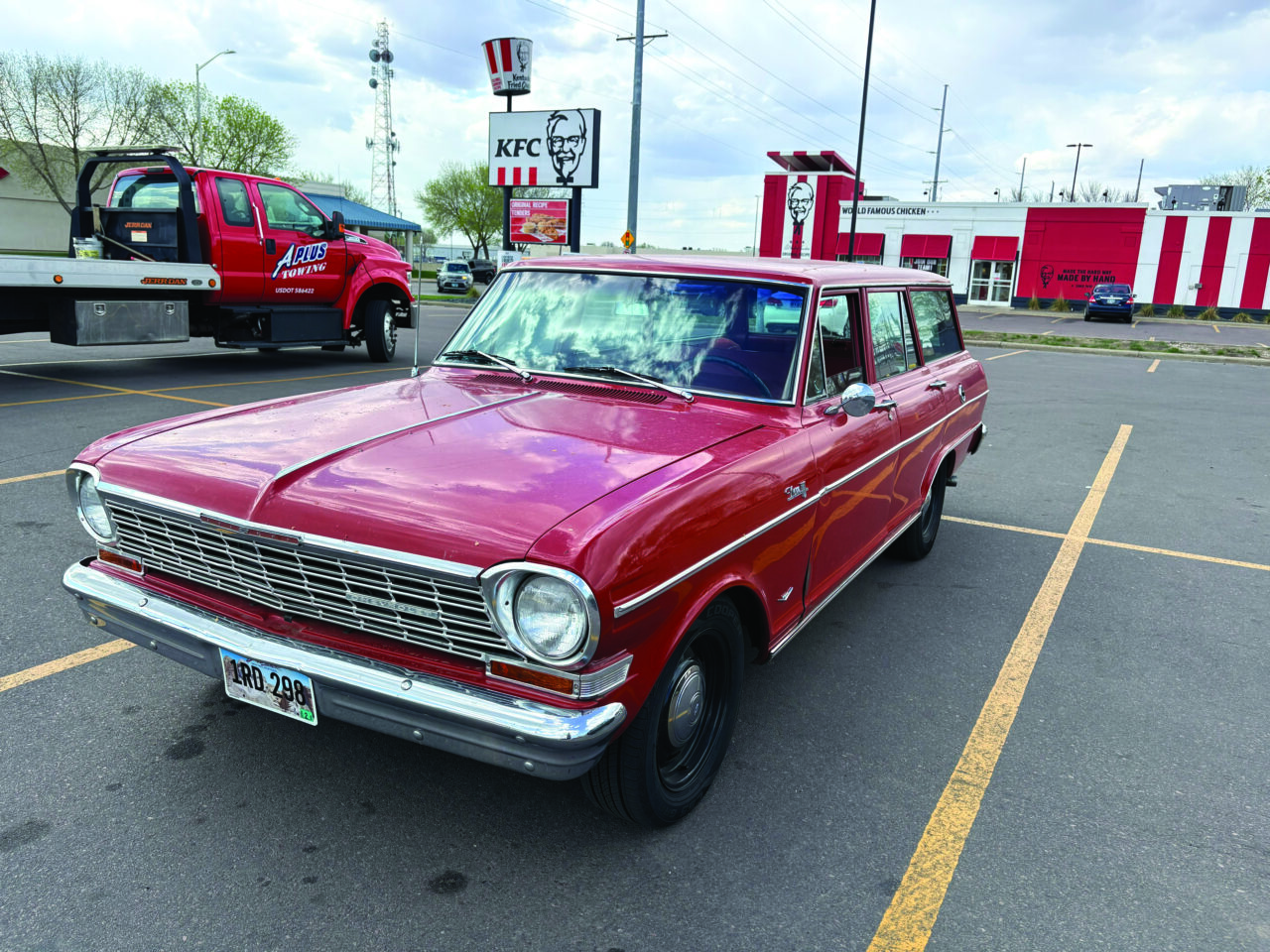
    Figures A and B: Two photos taken on different days with very different lighting situations: midafternoon and cloudy for the red Nova wagon and sunny late afternoon for my green FJ Cruiser. 

    Figure A

    Figure C: A composite created using three different AI tools and surprisingly few steps to complete this convincing effect.

    Figure B
    Figure C

    Select Subject and Generative Fill

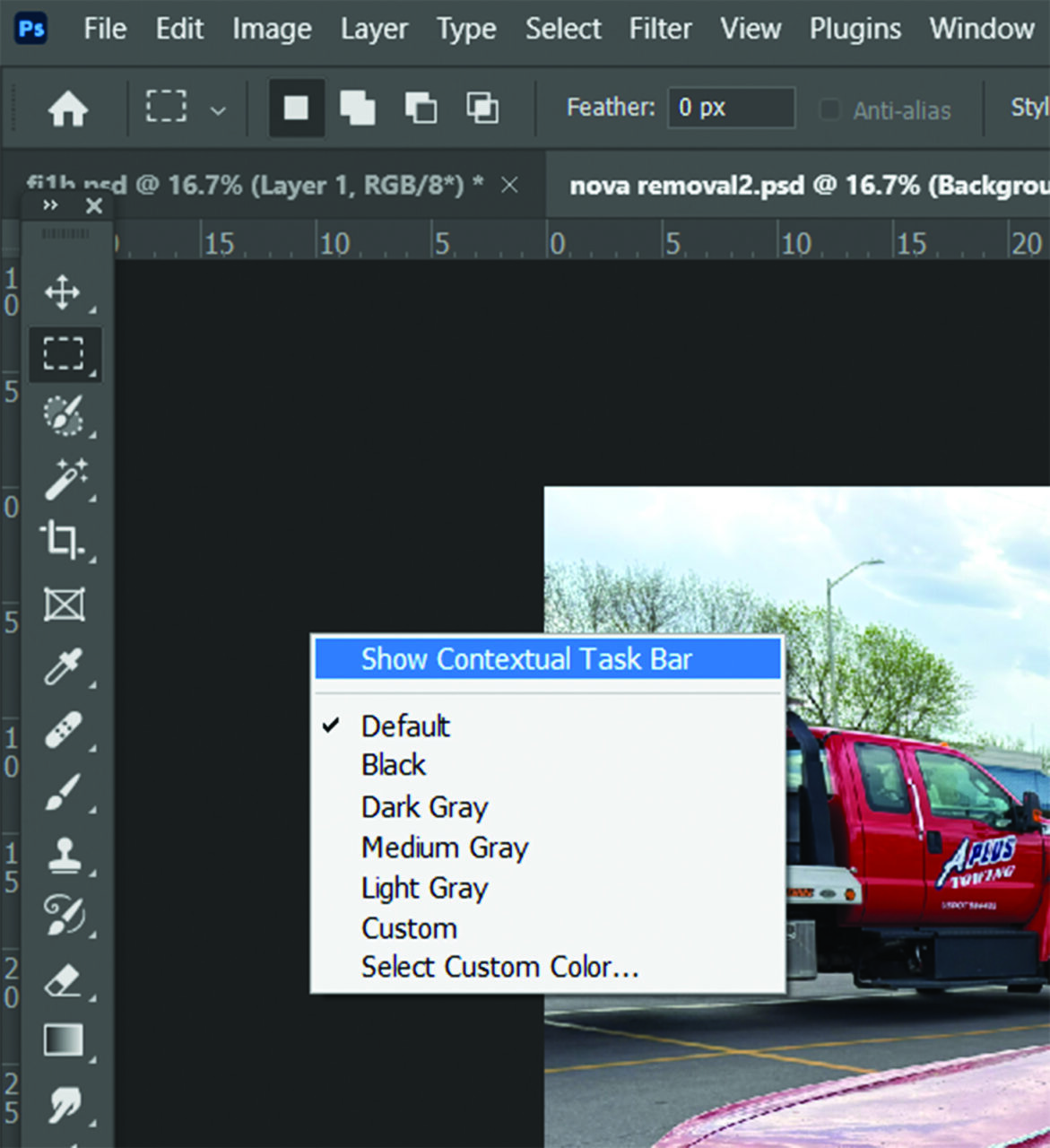
    Access the Select Subject option in the Contextual Task Bar by right-clicking in the empty workspace (not the image) and selecting Show Contextual Task Bar (figure D).

    Figure D

    To select the most prominent object in the photo, use Select Subject. Depending on the computer’s processing power, this could take as little as five seconds and often does a better job than I could have done manually with the Polygonal Lasso Tool.

    Next, in the same Contextual Task Bar, the Generative Fill option appears. I selected it. At that point, I could have chosen to fill the space with whatever I wanted: a fruit basket, twelve monkeys, or another random vehicle. But in this case, I entered the prompt, “Remove the car.” 

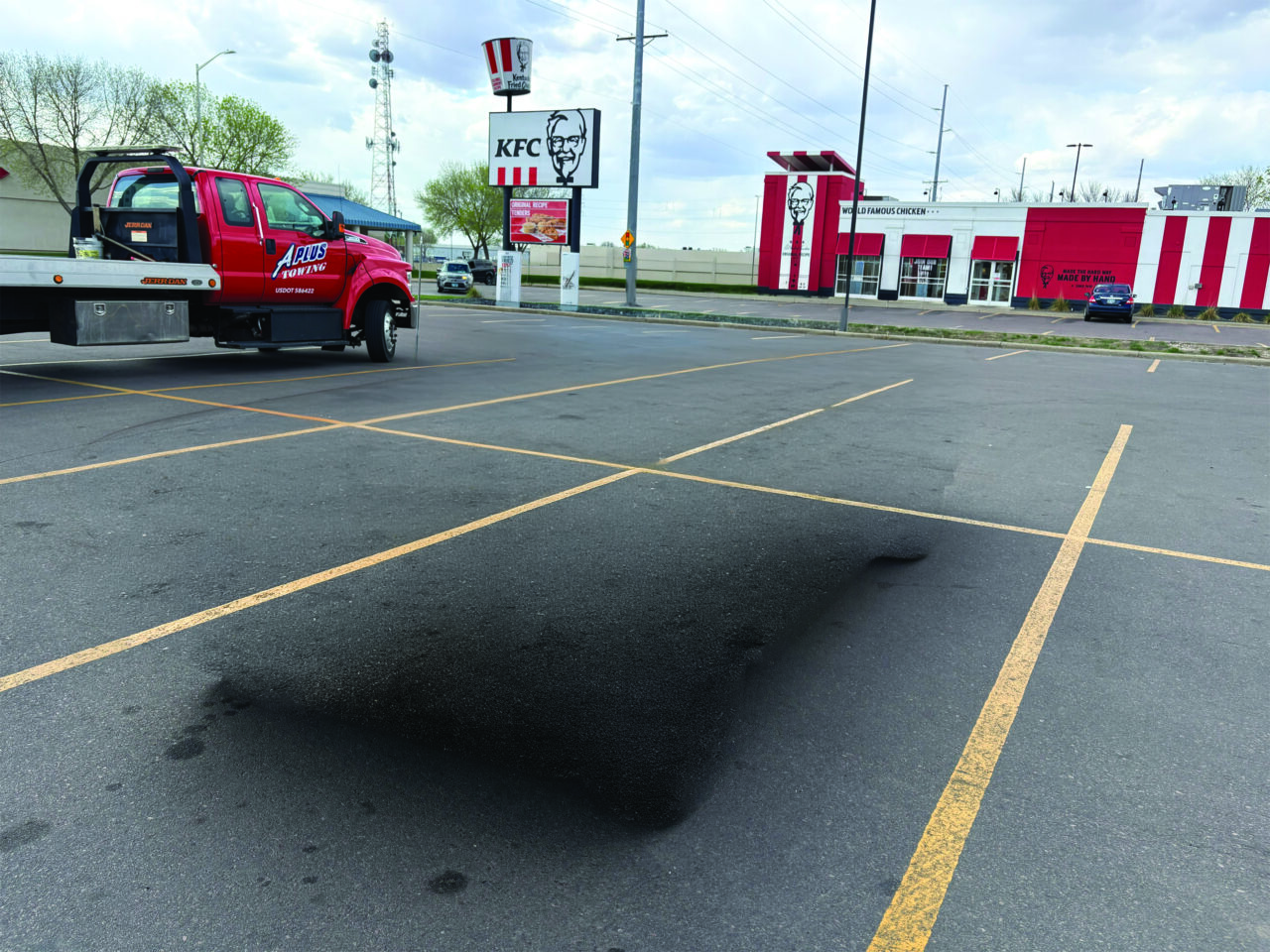
    Photoshop completed the task in seconds, leaving an empty space in the parking lot (figure E). It was not perfect; there was a bit of residual shadow left behind from the Nova, but it was still pretty impressive.

    Figure E

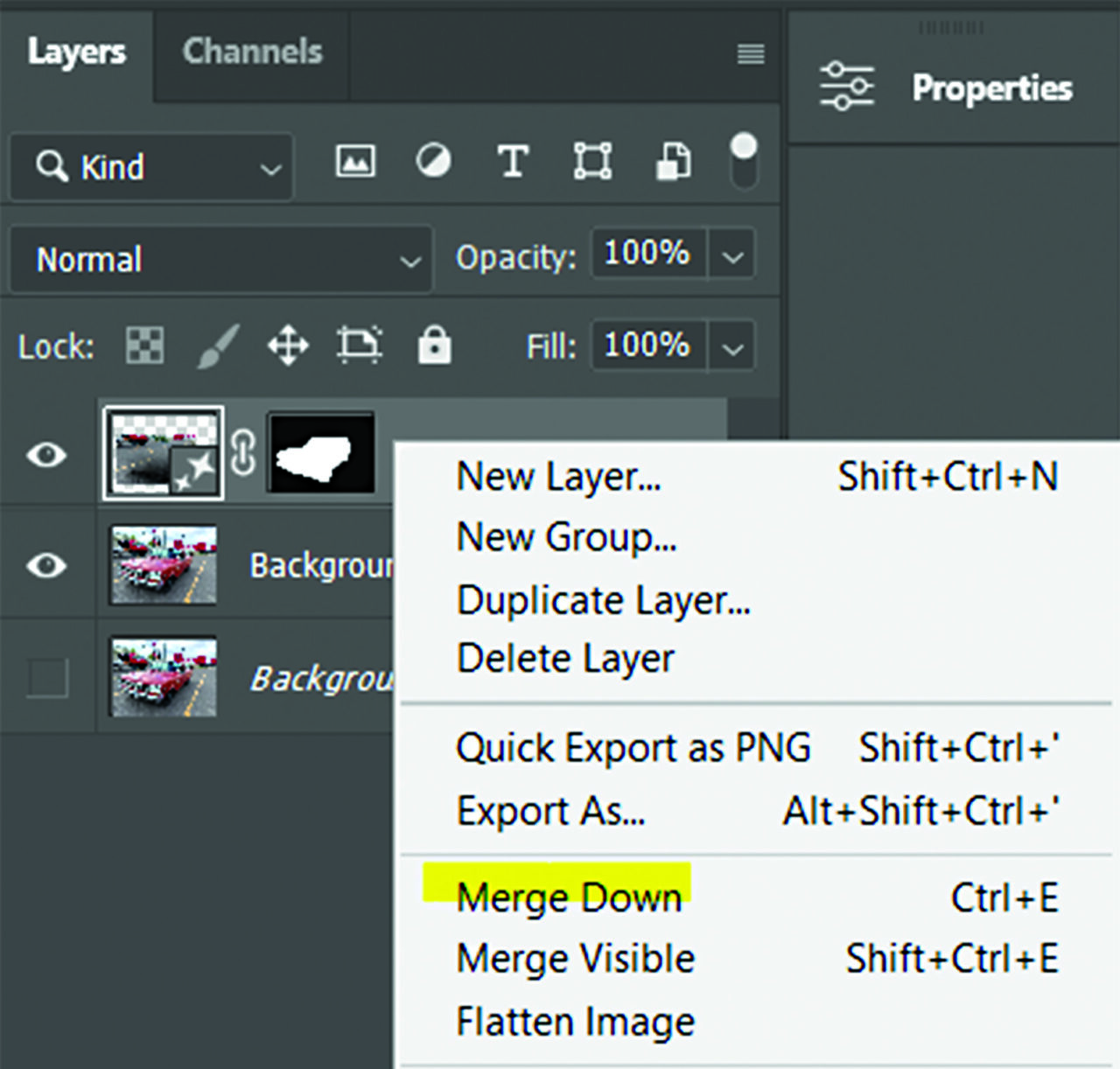
    I then right-clicked the newly created and merged empty-parking-lot layer and merged it down into the layer below (figure F).

    Figure F

    Next, I opened the photo of my FJ Cruiser, used the same AI selection option, copied it (Ctrl+C), and pasted it (Ctrl+V) into the parking lot file, above the layer containing the empty parking lot (figure G). The FJ and the background looked about as natural together as a fish on a bicycle. 

    Figure G

    Harmonize Layer

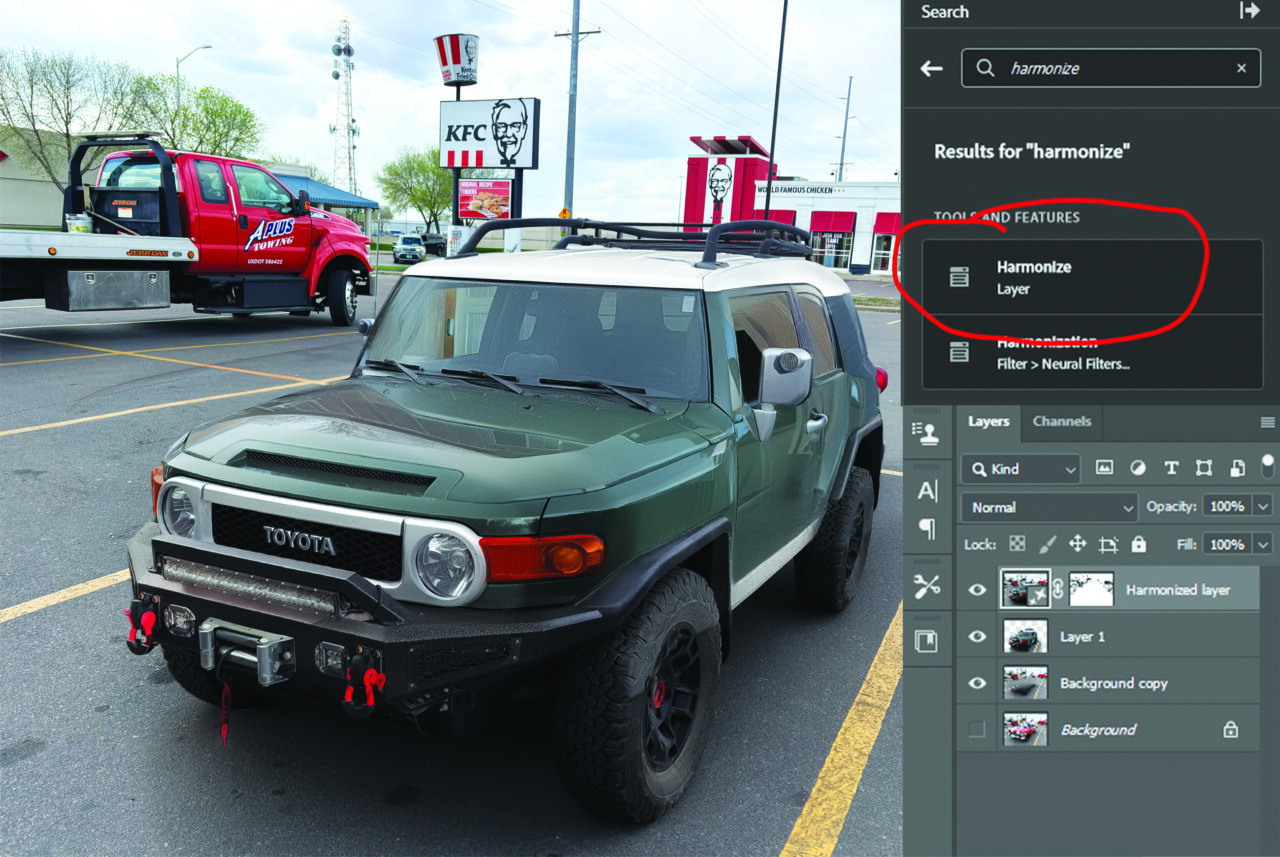
    You’ll locate this feature with the search bar in the upper-right corner of the workspace. Type “harmonize” into the search field, and the Harmonize Layer option should appear near the top of the results.

    After confirming I had selected the FJ Cruiser layer, I chose the Harmonize Layer option (figure H). This process took a bit longer, but it adjusted the lighting to match the cloudy conditions of the image below. However, it also created a new shadow under the FJ and partially removed the shadow from the hood. It also gave me two other renderings to choose from. I chose the first option. Then I merged that layer into the one beneath (the parking lot). I copied the new image, pasted it into a new document, and saved it; the illusion was complete.

    Figure H

    Of course, I would be remiss if I didn’t also show how these new AI features can be applied in a real-world situation, like the T-shirt design in figure I.

    As with most emerging technologies, some AI design tools will become more relevant than others, depending on the type of work or the project at hand.

    Full disclosure, AI was used to assist with definitions of these AI features, improve spelling and grammar, and generally polish my sentence structure. The photo of the lady in the white T-shirt was found on Pixabay.com and is an AI-generated image. However, the design and the article itself still come from human skills, honed over time.

    Figure I

    Like everything in life, there are few guarantees, but one of them is change. I am not ready for retirement yet, so I am adapting and learning at least until the robots take over. 

  • APA Supplier Members Mark 50-Year Membership

    Longtime supplier members of the APA recently marked more than 50 years of continuous membership.

    The long-running memberships highlight both their longevity and the association’s deep roots in the industry.

    Classic Medallics and Singer Company (member since 1970), Simba (1975), and Julie of California (1976) each joined when the organization was still in its early iteration as the California-based Trophy Dealers of America. 

    Founded in 1967 with just 13 members, the association quickly became a hub for collaboration and growth, including hosting the industry’s first trophies-only trade show in 1974.

  • STAHLS’ Takes Heat Press Pro Day on Tour

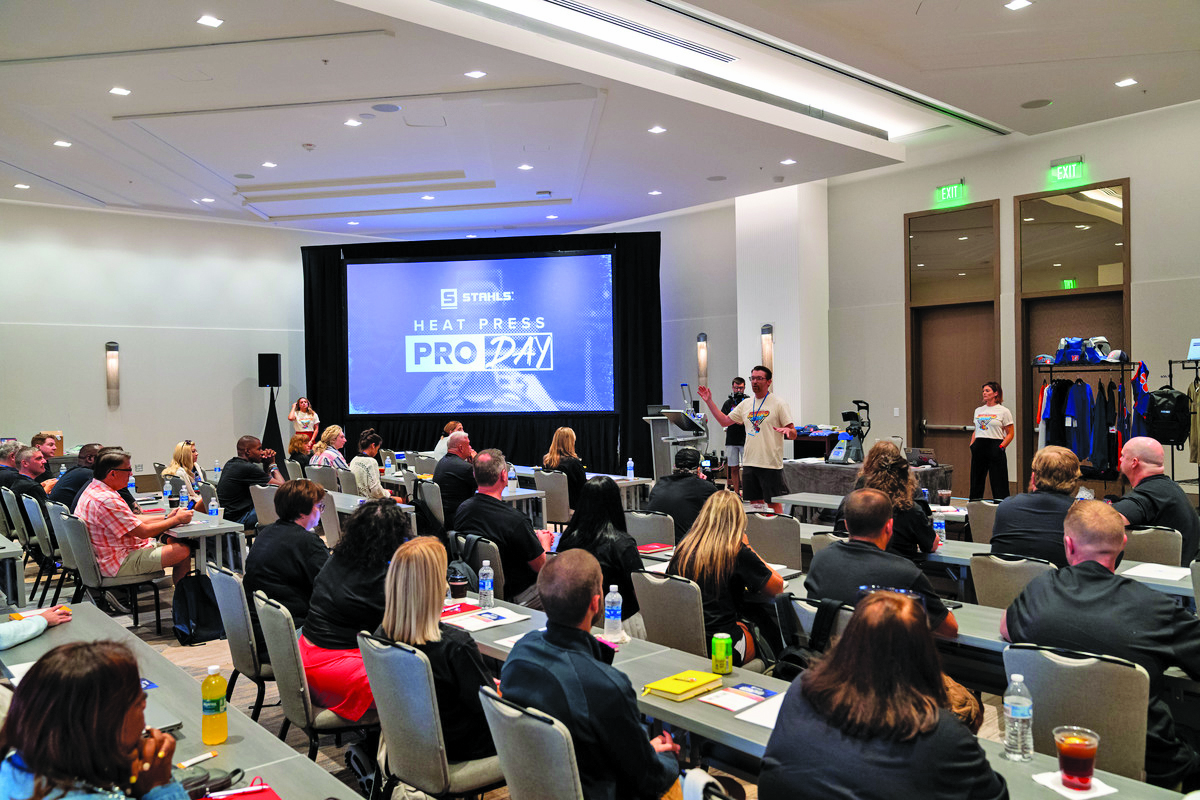
    STAHLS’ announced its Heat Press Pro Day on Tour, a traveling hands-on education experience designed to “help decorators, entrepreneurs, and print professionals grow smarter and more profitable with heat printing.”

    Heat Press Pro Day on Tour delivers in-person half-day workshops hosted in key markets across the United States, giving attendees direct access to STAHLS’ education team, real equipment, and proven production strategies. The series is designed for both new and experienced decorators, and each stop offers practical training focused on improving efficiency, expanding product offerings, and increasing margins through modern heat-printing techniques.

    “Decorators learn best when they can touch the equipment, see the process, and ask real questions about their businesses,” says Kelly Walters, senior director of experiential marketing at STAHLS’. “Heat Press Pro Day on Tour brings that experience directly to local communities, making it easier than ever to gain hands-on skills, explore new decoration methods, and walk away with strategies that drive growth immediately.”

    Registration for Heat Press Pro Day on Tour is $25, which is credited back to each attendee’s STAHLS’ account after attendance. Participants also receive custom samples and exclusive product insights to help them sell higher-value decorated apparel. To keep the experience interactive and impactful, attendance at each location is limited.

    Each event is led by members of the STAHLS’ education, marketing, and sales teams with real-world decorating experience and a deep understanding of what it takes to succeed in the apparel market.

    Retailers can view upcoming locations and register for an event near them by visiting stahls.com/pro-day.

  • Rules Were Meant To Be Broken: Cheryl Kuchek’s journey from hobbyist to influencer

    Sublimation is more than a printing method for small business owner Cheryl Kuchek; it is a die-hard passion born of the pull of possibility. While modern sublimation printing excels at producing full-color designs with superior vibrancy, detail, and finish, early technology had its limitations. Such roadblocks did not stop Kuchek from experimenting. 

    “Anything that could take heat, I was testing and finding a way where there wasn’t a way before,” she says, noting there was a lot of trial and error. “If 350 degrees was the recommended temperature and I wasn’t seeing results on a certain material, then I would adjust the settings, retest until I achieved success in getting something to press or stick.”

    Kuchek says she wanted to “rewrite the book” on sublimation and share the latest technology and techniques with fellow makers. She launched an exclusive Facebook sublimation group to chronicle the labor of love alongside fellow hobbyists. She focused on effective tips and tricks, how-to segments, equipment recommendations, and eventually, live-streaming sessions with industry experts. 

    Fascinated by the science behind crafting, Kuchek continued experimenting with unconventional techniques, such as sublimating store-bought white wrapping paper to create personalized wrapping paper and sublimating acrylic to make headbands and bracelets. 

    Further Growth 

    As Kuchek continued experimenting with substrates and sublimation techniques, her online following grew. 

    “I was an affiliate and influencer before they were a thing and soon [dubbed] the queen of hard substrates,” she says.

    Eventually, she developed several working relationships with industry suppliers, leading to further collaboration, product beta testing, and special vendor discounts for the group. Creative and savvy, Kuchek also promoted and sold her sublimation creations to the captive audience. 

    “It was becoming less of a hobby and more of a business opportunity,” she says.

    In 2009, with encouragement from her followers, Kuchek launched Just My Imagination DeZigns as a business for her personalized products. She continued blending various personalization methods to create one-of-a-kind glassware, mugs, coasters, cutting boards, plaques, and ornaments for clientele. 

    “Part of my secret sauce has always been to learn how to do everything with anything they say you can’t do,” Kuchek says.

    Once business operations evolved from a side business to larger repeat orders, Kuchek relocated to a 1,600-square-foot commercial space. 

    “It became my personal playground,” she says. “At that point, I was experimenting with white toner, laser, sublimation, and much bigger equipment.”

    Although she was producing commercial projects at lightning speed, Kuchek always made time to stay engaged with loyal followers who elevated her from a hobbyist to a professional. The successful blueprint, built on a proven foundation of relationships, quality, and collaboration, served as inspiration for her next venture. 

    Climbing to New Heights

    Kuchek drew on her vast knowledge and creative ingenuity to launch a new passion project, Sublimation Summit, an exclusive conference designed to inspire crafters and entrepreneurs in sublimation and heat-transfer customization. The goal was to create an accessible, hands-on educational experience featuring subject matter experts, workshops, and unique substrates.

    The dream became reality in 2019 when Kuchek signed a contract to host the event at the Peachtree Conference Center in Georgia. With just three months to plan the inaugural Sublimation Summit, Kuchek tapped her contacts and organized 92 classes as the main attraction.

    “The best of the best were there to present [and represent the industry at large]. It was a huge success,” she says, noting hundreds of attendees showed up in support. 

    As a result, participants explored untapped potential, and Kuchek says attendees walked away with proven tools to scale their hobby or business to the next level. 

    This success warranted a follow-up performance. While the Sublimation Summit pivoted to a virtual platform during COVID-19, it still offered an effective way to gather, share insight, and collaborate in the spirit of creativity. 

    “I wanted to differentiate the virtual Sublimation Summit and make it the best it could be [given the circumstances],” she says. 

    The online event featured a welcoming 360-degree viewpoint, allowing attendees to easily interact with virtual booths, participate in e-learning, and shop related products. While Kuchek was initially reluctant to host the summit virtually, it was well attended and inspired a handful of subsequent virtual events. 

    “The vendors and attendees loved it,” she says.

    Push Past the Brink

    With mounting success and thousands of followers, Kuchek doubled down by furthering her hands-on training.

    In 2023, she started beta testing an Epson direct-to-garment printer, “pushing every boundary to produce hard substrates on something you aren’t supposed to,” she says. An xTool F1 laser followed, with UV and direct-to-film printers soon thereafter. 

    Every day it was the same process: test, record, refine, and repeat. Any insight gained was an insight shared with Sublimation Summit supporters and loyal social media followers. 

    Her individual findings led to new professional opportunities, including a 12-week course and custom application development designed with makers in mind. 

    Looking ahead, Kuchek considers herself on the front lines of artificial intelligence (AI). 

    “I’m all in,” she says, emphasizing the desire to play an integral role in the positive impact. “How will it help makers do what they do better, faster, and more affordably?”

    Kuchek is both intrigued by and committed to the ethical rollout and integration of AI, with plans to continue educating her community of loyal followers on how to rise to the occasion. 

    “When you combine laser, UV, and sublimation, it’s the biggest game changer out there. Add AI into the mix, so you can create these amazing designs that no one else has, forget it!” 

  • Focusing on the Format: How small-format personalization gives retailers a new way to stay agile

    For the modern personalization retailer, growth goes beyond simply upscaling production equipment and space. In some instances, growth for the practical retailer comes from finding new ways to sell customized goods quickly and profitably. In others, from tapping new customers they’ve never explored before.

    These are just a few reasons why small-format personalization continues to gain traction. Compact laser- engraving systems—typically featuring small tables around 24 inches by 12 inches, standard electrical power, and limited footprints—help retailers expand product offerings and shorten turnaround times. That approach creates a practical path to new revenue while still delivering products that have a personal touch and longevity.

    Mike Dean, vice president of sales and marketing at Epilog Laser, says one of the clearest advantages is the ability to expand product offerings without incurring overhead.

    “Small-format laser-engraving and -cutting machines empower retailers to expand their product mix without expanding their footprint,” he says.

    Meeting New Demands 

    That flexibility is crucial in a market where many businesses are balancing limited production space, increasing costs of doing business, showroom needs, fulfillment demands, and a wide range of custom jobs.

    Plus, the flexibility of small format helps retailers respond to changing customer expectations around order times.

    “Today’s consumers expect fast access to personalized products, with little to no wait time,” adds Dean. “Small-format laser systems allow retailers to meet that expectation by bringing production directly onto the retail floor or into compact workshops.”

    For shops that handle personalized orders, short runs, and detail-sensitive jobs, that speed can become a real competitive advantage.

    Dean says the biggest benefit of bringing small-format engraving in-house is straightforward. Retailers can turn jobs over relatively quickly without waiting for a third party. What’s more, personalizing these goods in-house gives that business a tighter rein over quality and the ability to make last-minute changes.

    Changing Workflows

    Vikram Agrahar, founder of EzCarve, points to workflow as another important part of the equation, particularly systems designed specifically for smaller objects. EzCarve, for example, is a floor-standing, kiosk-style machine with a roughly 1-square-foot footprint, built-in cooling and smoke filtration, and a design that lets operators roll it into place and set up in under two minutes. It features a system built exclusively for drinkware engraving, reducing the extra setup steps that often slow production.

    “We have had customers who wanted handwritten messages or art engraved onto drinkware, wraparound tumblers engraved with kids’ names, personalized perfume bottles for special occasions, high-end champagne glasses, and even bottles of bourbon [or] champagne,” Agrahar says.

    Those sophisticated requests can be difficult to handle efficiently on full-size systems, especially when items are tapered or unusually shaped. Full-size systems require jigs, alignment, focusing, and other setups before engraving can begin. All those microadjustments add to production time and can make it less lucrative for shops to produce smaller goods. 

    The ease of use also lowers the barrier to entry for retailers expanding product categories. Dean makes a similar point about adoption, saying the machine itself is often the easy part. The learning curve, he says, usually comes from preparing artwork for engraving rather than operating the laser. Fortunately, users can create designs in familiar software like CorelDRAW or Adobe Illustrator and send jobs directly to the machine.

    Practical Decisions 

    For many businesses, the financial case is just as compelling as the operational one. Agrahar estimates that bringing small-format engraving in-house captures the “personalization premium,” generating 70–85% profit margins on services such as custom drinkware and on-site customization. 

    If retailers opt to outsource large jobs, a faster small-format workflow gives them the capacity to decide what to keep in-house and to retain more profitable medium-sized orders. For instance, slashing the time for an 800-tumbler job from 17 minutes per piece to a fraction of that.

    Dean says the businesses that benefit most are those focused on short runs or fast turnaround. That includes gift and personalization retailers, awards companies, promotional products businesses, liquor shops, university/museum gift shops, wineries, breweries, event/wedding planners, smaller shops and start-ups, corporate teams, schools, and even manufacturers using engraving for labeling, branding, or prototyping, all without needing a large equipment footprint.

    “If a business values speed, customization, and control, and doesn’t need to produce high volumes all at once, a small-format laser engraver can be a really smart addition,” he notes.

    Overall, drinkware is the standout product category for small format, particularly tumblers.

    Dean notes that powder-coated tumblers remain strong because they work across a wide range of applications, including corporate branding, promotional products, awards, fundraising, gifts, and retail personalization. Their variety of sizes, shapes, colors, lid styles, and price points allows businesses to target both premium corporate gifts and everyday items. 

    Other customizable drinkware, like water bottles and cocktail glasses, are strong matches for small-format engraving.

    New Innovations

    Emerging tech is making small format even more accessible. Epilog’s innovations, such as Fusion IRIS HD+ camera technology for precise artwork placement on irregular items, browser-based control via Epilog Pulse to send jobs from any device, and PrintAPI for workflow automation, help businesses scale efficiently.

    For retailers considering the category, sources recommend looking beyond entry price.

    “The difference isn’t just price; it’s reliability, workflow, and the scalability of the business model,” Agrahar says. “Entry-level systems often use fragile DC glass tubes and manual focus, which is better for hobbyists. Advanced ones use RF metal tubes and automatic focusing for retail reliability. First, figure out what market segment you want to expand into and get the right small-format laser engraver for that purpose.”

    At a time when customers expect short turnaround and detailed customization for special gifts, small-format personalization gives retailers a practical way to stay competitive. For shops looking to expand production, improve turnaround times, and keep more profitable work in-house, this is an opportunity to build a more agile business.  

    School awards have long been a major profit center for retailers. Team sports are often the first category businesses consider when working with schools, but personalization can extend beyond tournament trophies and student awards. 

    Staff, students, and parents alike now see recognition as an ongoing effort that acknowledges the entire community rather than just a single sport or team. 

    By leveraging this community mindset, retailers can expand their offerings for schools and drive more recurring revenue with practical products that celebrate school spirit year-round. 

    Connecting with Buyers 

    Finding the right decision-makers to pitch these new product ideas to at a school can be approached from a few different perspectives, including a top-down approach and a bottom-up strategy. 

    “Start with the school’s activity director,” Dave Haan, marketing manager, JDS Industries, recommends. “They will know who leads every team and group in the school.” 

    That director will typically know which groups or clubs need awards at the school and whom to speak with. Haan notes that even if it’s not an immediate sale, developing rapport with top school administrators can pay dividends in the long run. 

    For the bottom-up approach, retailers may need to conduct additional research to identify who is affiliated with the school and how to reach them. Connie Tsang of Time Products International suggests considering everyone from students to school board members to event and promotion organizers. 

    Contacting a school online is a simple way to get started and identify the right contacts. Generally, most school sites will have a list of key email and phone contacts for advisers and activity directors. 

    “Introduce yourself, briefly explain what you do, and ask who handles awards and spirit gear for the group,” adds Haan. “Once you have the decision-makers’ contact info, you’re in business.”

  • Beyond the Price: Creating value in high-end products without the cost

    As the award industry evolves and new generations enter the space, the personalized-product market is not only evolving but thriving. 

    According to research, millennials and Gen Zers are placing greater value on customized goods, such as high-end personalized drinkware, serveware, and more. 

    This demand creates a productive market for suppliers and retailers looking to diversify their product lines. Top-shelf, personalized products can be lucrative, particularly when companies create the perception of value at a price tag that won’t break the bank.

    Capturing Luxury Without the Expense

    How can suppliers and retailers innovate cost-effectively in the high-end-product space? Diversity in products made from a variety of materials that have a practical cost point can create a high visual impact. 

    Layering and mixing media can also create unique designs.

    “We often associate luxury with natural materials and clean lines,” says Jackie Faeth, Rowmark’s marketing coordinator. “Think diamonds, granite, leather, and polished metals. These materials are beautiful, one of a kind, and rare, and fetch a high price tag.”  

    However, these aren’t practical materials when sourcing supplies for a cost-conscious business, Faeth points out. This is where suppliers who offer a broad range of materials come into play. 

    Perception of quality is still king when it comes to drawing in customers. And that’s especially true in the personalization market. 

    For J.Charles vice president of sales Kale Wallner, the physical feel of holding a product in hand can create a sense of luxury, as can the use of traditional etching technology for clean customization. 

    Visual elements, Wallner suggests, can also reinforce that sense of luxury. 

    “The quality, look, and feel of the product help with the perceived value, coupled with creative design, helps further elevate a product,” he adds.  

    Finding the Sweet Spot

    Competing with e-commerce giants is an ongoing challenge for retailers and suppliers alike. And it’s often hard to gauge the continued impact on the economy. 

    “It doesn’t matter what company or what industry, the Amazons out there are eating our lunch because people can get things so inexpensively, with free shipping, and so on,” says Wallner. “I embrace it, because we can’t just put our heads in the sand and ignore it, because it’s not going to go away.”

    However, e-commerce giants often lack high-quality materials, customization options, and sometimes even safety standards, as international regulations on materials aren’t as strict as domestic requirements.

    That opens the door for luxury items at an affordable price point to excel from U.S. suppliers and retailers. 

    “For me, it’s about personalization. It’s a big differentiator from the products on e-commerce sites. And, of course, it’s also about quality,” says Wallner. “Customers want to feel that heft of a quality piece, for instance, and it doesn’t need to be made from the most expensive materials, but it goes a long way to the perception of luxury.”

    Faeth also notes a massive opportunity for small and midsize retailers to create custom products that match their customers’ visions. 

    “For the best results, don’t leave options completely up to the client’s imagination,” she points out. 

    Faeth suggests retailers guide customers to their dream products by providing direction and education. This is typically done by showing and simplifying customization options, for example, providing a presentation of three different award-design options at three different price points. 

    “Given a choice of three price points, studies show that about two-thirds of end users who make a purchase will choose the middle (‘better’) one,” Faeth suggests. “This also holds true with the sign-making and personalization industry.” 

    Presenting customers with luxury options also gives retailers the chance to sell them on upgrades, whether through customization or higher-end products. 

    “Your client’s confidence in your abilities will increase when they see your creativity, knowledge, and experience,” Faeth adds.

    Navigating the Unknown

    Opulence and affordability can sit at the same table. And often, it means a win-win for suppliers, retailers, and ultimately, customers. But as tariffs and manufacturing costs continue to rise under current economic conditions, strategic decisions have never been more important. 

    Both Wallner and Faeth suggest being open to new items while keeping a discerning eye on what will actually sell.

    “In my opinion, trophy shops need to diversify and continue to expand their lines,” which can include expanding the luxury goods lines successfully, Wallner says. “But they need to find what they are good at and master it. You can’t be everything to everyone.”

    Understanding the audience, their spending patterns, and your specialization is key. According to a Retail Dive study on gifting, 65 percent of Gen Zers and millennials rely on social media platforms to find offers and discounts. That number is nearly twice that of older generations, which stands at 35 percent. Older buyers take a more commonsense approach to gifting, as most (79 percent) say that cost is their primary concern when making purchasing decisions.  

    And while understanding your audience and demographics is often discussed, it is not always fully applied to achieve the best results.

    “In general, there’s a tendency to underprice and undersell custom work,” says Faeth. “It’s also important to remind yourself that customers pay for value, not hours, so don’t undervalue the skill and creativity behind what you do.”

    It’s also about recognizing trends in materials and manufacturing, including tactile and stone-inspired materials.

    “Affordable alternatives, like textured acrylics and faux leather with a soft, leatherlike hand, also continue to trend in apparel, awards, and personalized gifts,” she points out.

    Another trend that is becoming more prominent is retailers outsourcing the creation of personalized products to suppliers. 

    This approach has the potential to create pieces at a lower cost, generally, and in less time, and often allows drop-shipping directly to shops and/or customers. In some cases, it also allows retailers to upgrade the materials they use due to savings across the board.

    “I’m seeing more recognition shops that are also changing how they go to market,” says Wallner. “It also helps them diversify their lines. If somebody comes in and says, ‘I want crystal, but I want sandblast,’ and if it was something the retailer doesn’t do in-house, instead of losing that sale, now they can add the business.”

    In addition, the use of social media should be part of a solid marketing strategy. Wallner is a proponent of engaging with social media platforms to keep growing networks within the industry. LinkedIn and Facebook are not only large public platforms but also places to find suppliers or potential customers. 

    The Sky Is the Limit

    While the high-end-product space is not usually the primary source of income for suppliers and retailers, there is a significant opportunity to enhance product lines and increase market share. 

    And as more people become aware of the value of goods with a luxury, customized feel without breaking the bank, there will only be more interest in ever-expanding product lines. 

    Faeth shares a strong parting thought: 

    “Price your work to the luxury space and it will find its way to the right buyer.” 

  • Putting the Tools to Work: Hotkeys and shortcuts for Lightburn

    Switching from one design software to another can be challenging when the tools, layout, and hot keys differ. If you’re using an all-in-one workflow like LightBurn and MillMage, there are a few key tricks to speeding up your processes.

    LightBurn (for lasers) and MillMage (for CNC routers) are made by the same people, so they’re already designed to work together within a single program from start to finish. If you’re working with both lasers and CNC routers, this setup is seamless because it uses the same tools, layout, and hotkeys.

    Here are some tips on speeding up and customizing your workflow in LightBurn, MillMage, or both.

    Quick-Selection Tools

    You can’t adjust an object unless you can select it, and you’ll also want to make sure you don’t accidentally grab anything nearby that you don’t want to change. Of course, clicking directly on individual objects is the most straightforward strategy, but it can be time-consuming.

    You’ll find several even faster options in the Edit Menu, including Select All (Ctrl+A/Cmd+A), Invert Selection (Ctrl+Shift+I/Cmd+Shift+I), Select Open Shapes, Select All Shapes in Current Layer, and more.

    The two box-selection options are also incredibly powerful. Click and drag left to right to create a green Crossing Selection box that selects everything it touches. Inversely, drag right to left to create a red Enclosing Selection box that selects only objects fully contained within it.

    Hold Shift while using click selection or box selection to add objects to your selection, and Ctrl/Cmd to toggle objects’ selection status: Select objects that aren’t currently selected and deselect those that are.

    Zoom to Selection or Page

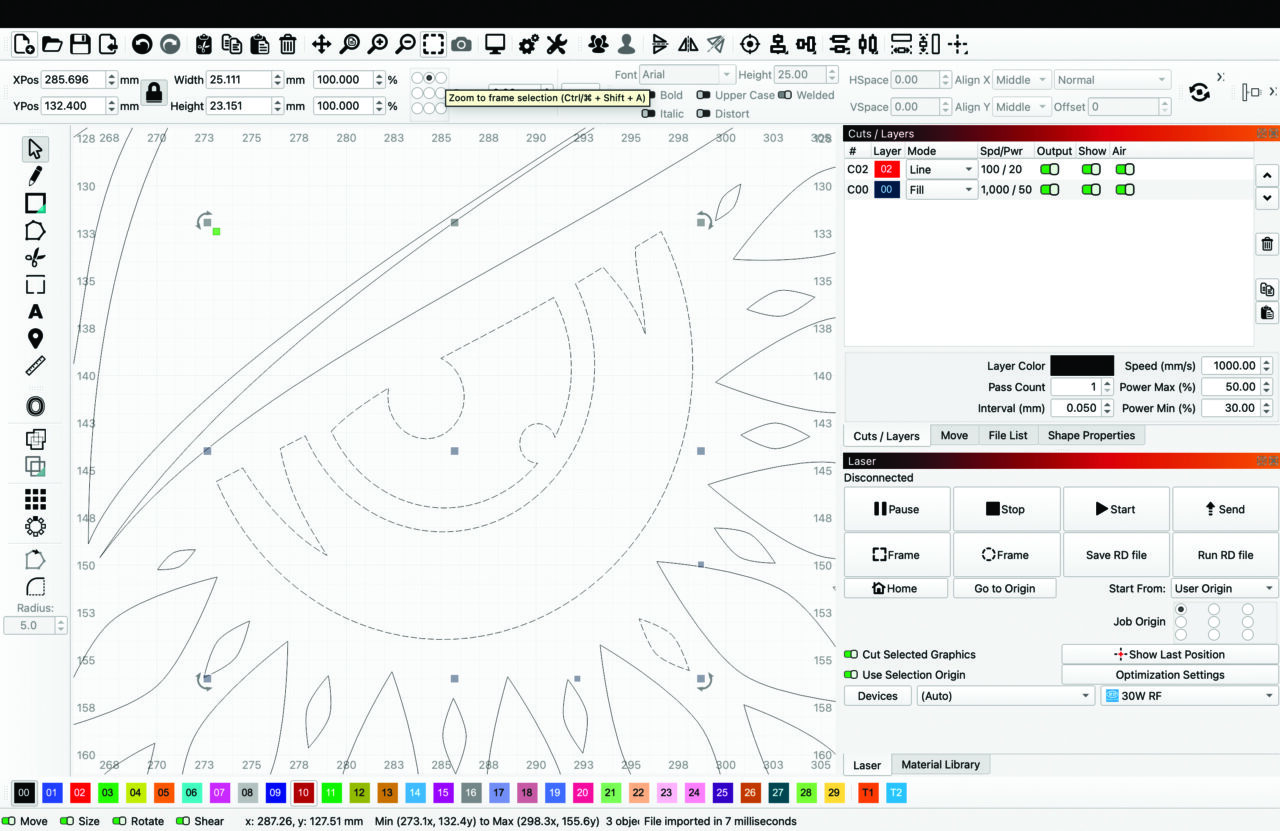
    Zoom To Frame Selection

    Zooming in and out while designing is essential, and you can always zoom with your keyboard’s plus or minus keys, your mouse’s scroll wheel, or two-finger dragging on a trackpad.

    You can also use two options to jump to what you need more quickly in both LightBurn and MillMage. Zoom to Frame Selection (Ctrl+Shift+A/Cmd+Shift+A) to jump to a view of just the graphics in your selection, and Zoom to Page (Ctrl+0/Cmd+0) to bring your entire Workspace grid into view.

    Single-Press Keyboard Shortcuts

    Every tool in LightBurn and MillMage is available in a toolbar or menu, and most have hot keys as well. But for some of the most common design and layout features, handy one-key shortcuts are also available.

    Here’s the one I use frequently: press P to center all objects in your selection in the Workspace.

    Several other hot keys align objects relative to one another’s edges or centers in a single press:

    • Align Left (L)
    • Align Right (R) 
    • Align Top (T) 
    • Align Bottom (B)
    • Align Vertical Centers (C)
    • Align Horizontal Centers (E)

    You can also rotate objects 90 degrees clockwise with the period key and 90 degrees counterclockwise with the comma key or nudge them in 5-millimeter increments using the left-, right-, up-, and down-arrow keys. The increments for nudge movement are all adjustable in your personal preferences (Edit > Settings).

     One note: These shortcuts only work when the Workspace is in focus. That’s a technical way of saying when the last place you clicked is somewhere within your design grid, rather than an auxiliary window or toolbar.

    Hotkey Editor

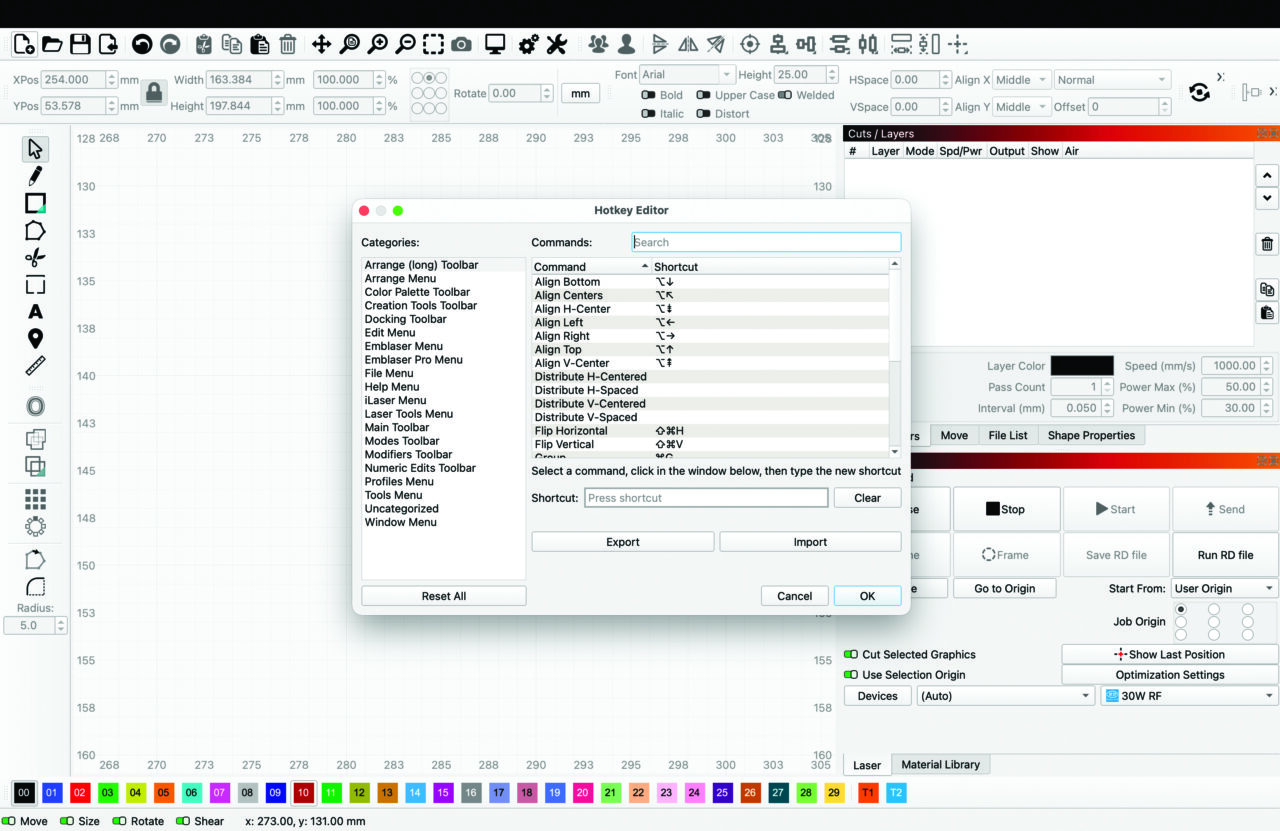
    Hot key Editor

    If you’ve got a handful of tools you use all the time, you can customize their hot keys to whatever shortcuts are most convenient to you. This customization is also a great option if there are certain tools you’re used to in other software and want to align your LightBurn/MillMage Hotkey Editor with your muscle memory.

    Go to File > Preferences > Edit Hotkeys to open the editor. Then select a tool and press the keys you want to set as a new shortcut. The editor will warn you if your chosen hot key is already in use; in that case, you can select another or clear the hot key from the existing tool.

    You can even export and import these custom hotkeys to ensure they’re synced across multiple installations. This is especially helpful if you’re upgrading or adding new equipment to your existing lineup. 

    Workspace Customization

    The LightBurn/MillMage Workspace is highly customizable. Enable or disable any window or toolbar by going to the Window Menu and clicking an entry in the list. Any Window or toolbar with a check mark next to its name is enabled; those without are turned off.

     You can also move windows and toolbars around, either undocking them to float independently or redocking them somewhere along the left, right, top, or bottom of your screen. The exact docking locations depend on your display size and the size of your device, but the possibilities are nearly endless.

    You can also resize most windows and toolbars by hovering over their tops, bottoms, or sides until you see a two-arrow icon appear, then click and drag. Note that some windows have a minimum size you can shrink them to, and that can also affect your ability to resize adjacent windows.

    If you ever decide you’ve changed too much, go to Window > Reset to Default Layout to return to the original appearance from when you first installed.

    Dark Mode

    Dark Mode helps give your eyes a rest if you’re in front of the screen for a long time. There are two ways to enable this feature in your preferences (Edit > Settings) under the Display tab.

    The default Application Theme is System Theme, which matches your default operating system preferences. For example, if your operating system is set to dark mode, LightBurn and MillMage will automatically be set to that mode as well.

    If your system is set to light mode, you can override it by selecting Classic Dark (or override a system’s dark theme by selecting Classic Light). 

    Note that any change you make to the Application Theme requires a restart to take effect.

    For more information on LightBurn and MillMage workflow-optimization tips, visit our documentation at Docs.LightBurnSoftware.com and Docs.MillMageSoftware.com. 

  • Reliable Connections: David Takes, Member2Member Forum moderator, highlights the benefits of connecting with peers

    For an industry built on precision and craftsmanship, having the right answer at the right time can make all the difference. That’s the idea behind the Member2Member (M2M) Forum. M2M is the Awards and Personalization Association’s private online community designed to connect members with the experience-based knowledge they need, when they need it.

    At the center of it all is David Takes, M2M’s moderator. Takes keeps the community professional, facilitates conversations, and ensures members connect with the right people quickly.

    “It’s a place where personalization retailers and suppliers can collaborate,” said Takes. “Whether that’s solving a production issue, finding a supplier, or sharing ideas that help grow their businesses.”

    We asked Takes, who was recently honored as APA’s 2025 Volunteer of the Year, to share more about why M2M is valuable to members. 

    Why is M2M a trusted source over traditional search engines or social groups for members? 

    There’s no shortage of information out there: YouTube, Facebook groups, Google, etc. The challenge is knowing what and whom to trust. M2M helps cut through that clutter. 

    The advice you get comes from experienced professionals within our industry. It’s people who understand the equipment, the materials, and the day-to-day, real-world challenges of running a shop. 

    What makes M2M special is members’ willingness to share their knowledge. In our industry, that kind of collaboration is incredibly valuable. Even with all the different social media outlets competing for our attention, M2M remains one of the most reliable resources we have for solving problems and growing our businesses.

    What are the benefits of using M2M as a retailer? And as a supplier? 

    For retailers, M2M is like having a trusted advisory group on call. Whether you’re troubleshooting a production issue, evaluating new equipment, or looking for product ideas, you can get straightforward input from people qualified to answer. 

    For suppliers, it’s a valuable way to stay connected to the real needs of the market. It allows you to answer questions, provide clarity, and build relationships by being present and helpful within the community.

    Tell us about the various communities within the forum.

    The forum is organized into different communities so members can easily find and participate in discussions that matter most to them at that moment. It keeps the wealth of information organized for future research and learning. These communities span production techniques, business operations, marketing/sales, graphics, and product localization.

    The community structure keeps conversations focused and makes it easier for members to both ask questions and discover relevant information.

    How can members get the most out of M2M? 

    The biggest factor is participation. The more you engage, whether that’s asking a question, sharing your experience, or responding to someone else, the more value you’ll get. 

    Detailed questions also tend to get more useful, actionable answers. A good example might be someone looking for a specific product on a tight deadline. Sharing your shop location will allow those assisting to provide a source closer to the shop owner’s geographic location.

    How often should members log in to M2M?

    A great habit is to make M2M part of your daily routine, just like checking your business email in the morning. Sign up for the Daily Digest email that provides the latest activity on the forum for the previous 24 hours. 

    Even spending a few minutes scanning new discussions can expose you to ideas, solutions, or resources that can save time or improve your workflow. Staying consistently engaged helps you get the most out of the community over time.

    How should a first-time member jump into M2M?

    The easiest way to get started is to dive in and participate. Introduce yourself and your business. Be inquisitive and ask questions about topics you may be struggling with or are curious about. Share positive experiences of some things that may have been working for you. Reply to existing threads to share your experience. You don’t have to overthink it—this is a welcoming group, and even small contributions are valued.

    What tools should members use to maximize M2M’s benefit? 

    A great forum tool that is often underutilized is the Search function. It’s the absolute fastest way to get questions answered, especially when inquiries are time sensitive.

    Sign up for the Daily Digest email. It will greet you once a day in the morning. You’ll be able to turn it off or on in your forum profile.

    With the Member Directory, you can even connect with others in your region, adding another layer of practical local insight.