Category: Insights

  • Blazering: How to Combine Laser Engraving and Sandblasting for an Innovative, Eye-Catching Effect

    Mixed-media personalization can be an excellent way to expand a retailer’s offerings, provided they start with the right equipment and expertise. Blazering, which combines the benefits of laser engraving and sandblasting, offers retailers a hybrid option that delivers precision and depth for highly detailed products. 

    Darin Jones, technical training sales specialist at IKONICS Imaging and a blazering advocate, recently shared insights on how retailers can approach this market and what they need to know before jumping in. 

    Blazering Defined: Clean and Detailed 

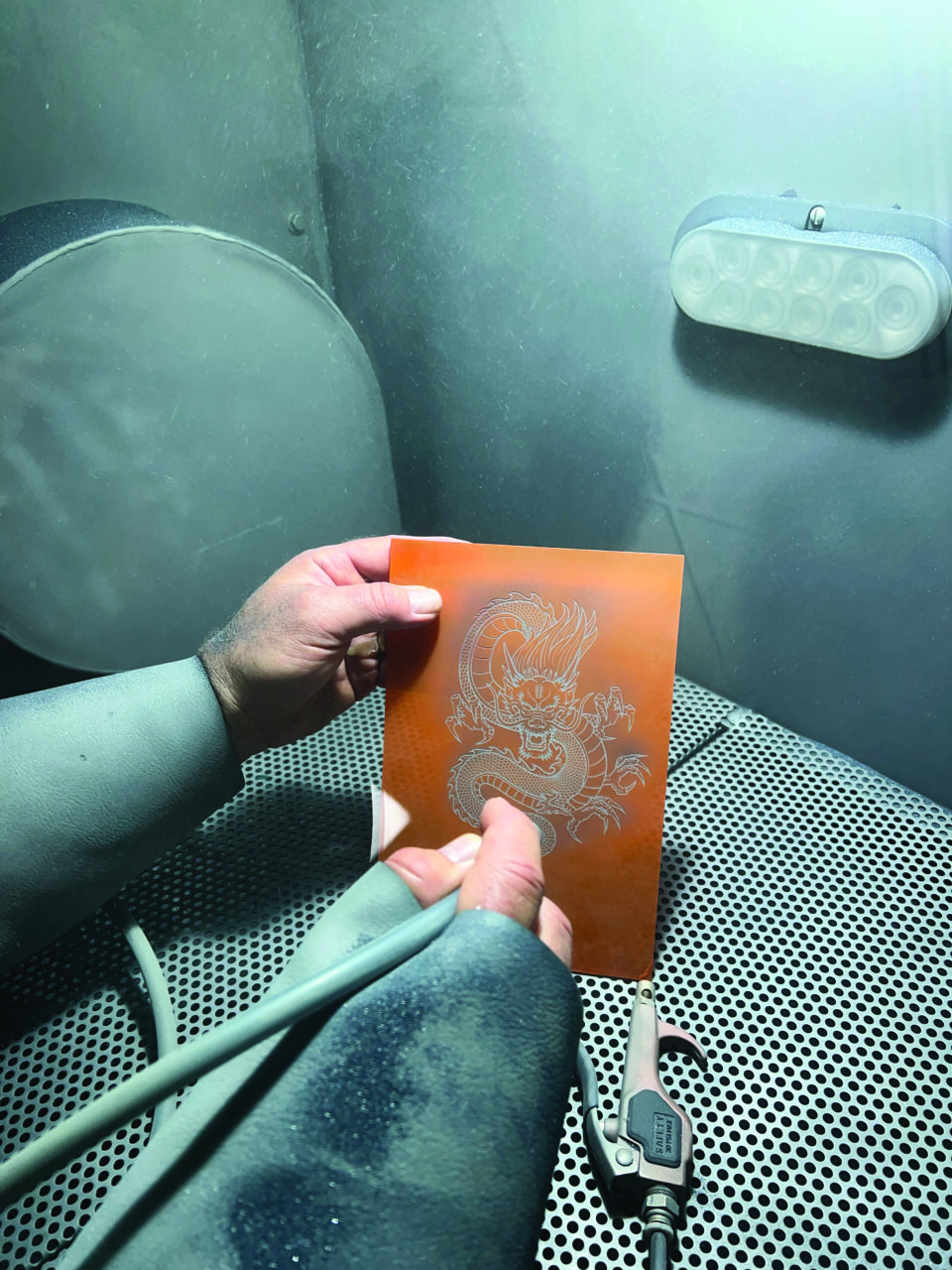
    By combining elements of sandblasting and laser engraving, blazering can create clean, detailed, and deeply etched designs on various substrates. Typical laser engraving produces a shallow burn; sandcarving requires manual stenciling. Blazering, meanwhile, uses a laser to burn the image into the mask on the item before sandblasting for enhanced results.

    Ideal Blazering Substrates and Applications

    Jones says it’s important to determine if the substrate is ideal for blazering before starting. 

    “My rule of thumb is if the item is breakable or chippable (like glass, crystal, or porcelain), can’t be lasered, and/or is very fragile, then I will suggest sandcarving for the deep etch,” he stresses. 

    If the item is scratchable and not breakable, like acrylic and precious metals, Jones recommends laser engraving as an alternative, as the look would be the same.

    Jones adds that the selection method will vary based on the customer’s order.  

    “Lasering will burn, and sandcarving is low-frictional heat,” Jones adds, pointing to wood as an example substrate. “On light wood, laser creates a dark burn, and on the same wood, sand carving creates a deep but lighter image that may require a wood stain.” 

    Step-by-Step Workflow

    Jones says the process starts with artwork: Create a black-and-white design where black areas will be etched. After that, apply a specialized mask, like Blazer Orange, to the substrate. Apply the blastable laser mask evenly and stretch it over curves to avoid bubbles.

    The remaining steps are as follows: 

    Place the item in a laser engraver at tested settings (e.g., high power/slower speed for CO2 lasers).  Jones suggests burning through at least 80% of the mask in the laser engraver, and the sandcarving machine will remove the remaining 20%.  

    “This saves time,” Jones adds. “Testing squares is the most common test; 100% power, 80% power, and so on.” 

    After finishing engraving, sandblast the product at approximately 40 psi with a nozzle distance of 4 to 6 inches. “We recommend silicon carbide and the sizes between 150 and 220 mesh,” Jones says. 

    Remove the mask and, if necessary, test additional iterations by laser engraving first, then blasting to create several samples and dial in the best settings for a repeatable process. 

    Key Points to Remember 

    The core process of blazering is straightforward, but Jones urges retailers to pay close attention to settings, speed, and mask application for the cleanest results. 

    “You can see the best of both worlds,” Jones adds. “First, you laser engrave the item, and if you are not satisfied with the appearance or depth, then you can put the item in the sandcarver to get another result.” 

    Additionally, Jones recommends a consistent etching speed of approximately 1 square inch per second for sandblasting, using pressure pots to ensure steady flow.

    Leveling Up 

    Once retailers are comfortable with basic blazering, they can step up their technique to more eye-catching decoration. 

    “Practice sandcarving on a blank piece of glass to see the color tones, different angle looks, and close and further away nozzle passes so you can see what your sand carver can do for multilevel and shading,” Jones suggests. “Outlines of the image are good for multilevel carvings.  For halftones, use high-resolution artwork so the dots remain sharp and round, which is ideal for sand carving.” 

    For color fill, Jones recommends images with thick outlines, which create a deep pool for paint to settle into. 

    Multilevel carving and shading create opportunities for products like drinkware, awards, and gifts, where a 3D-etched look differentiates from traditional flat engraving.

    Business Value and Education

    Ultimately, blazering can boost retailers’ margins by leveraging uniquely deep etches. Products made of hard glass or stone, for everything from premium drinkware to corporate gifts, often have a higher perceived value, allowing retailers to charge more. Plus, the detailed etching is perfect for online stores since the multi-angle 3D visuals will still look equally striking on a website as they do in person, he adds. 

    Going beyond a basic getting-started tutorial, Jones recommends that retailers interested in blazering participate in existing educational opportunities. This includes hands-on classes at the APA Expo and workshops hosted by GS2 Awards, a Trotec dealer. Trotec Laser also hosts blazering events at their locations nationwide, which GS2 and IKONICS participate in.

    “In today’s market, saturation is real, so offering products that other companies may not be aware of or ignore is an opportunity for a retailer to grow with blazering,” states Jones. 

  • Creating New Revenue Streams With School Awards: Milestones, Booster Clubs, and Employee Recognition Present New Opportunities for Personalization with Schools

    School awards have long been a major profit center for retailers. Team sports are often the first category businesses consider when working with schools, but personalization can extend beyond tournament trophies and student awards. 

    Staff, students, and parents alike now see recognition as an ongoing effort that acknowledges the entire community rather than just a single sport or team. 

    By leveraging this community mindset, retailers can expand their offerings for schools and drive more recurring revenue with practical products that celebrate school spirit year-round. 

    Connecting with Buyers 

    Finding the right decision-makers to pitch these new product ideas to at a school can be approached from a few different perspectives, including a top-down approach and a bottom-up strategy. 

    “Start with the school’s activity director,” Dave Haan, marketing manager, JDS Industries, recommends. “They will know who leads every team and group in the school.” 

    That director will typically know which groups or clubs need awards at the school and whom to speak with. Haan notes that even if it’s not an immediate sale, developing rapport with top school administrators can pay dividends in the long run. 

    For the bottom-up approach, retailers may need to conduct additional research to identify who is affiliated with the school and how to reach them. Connie Tsang of Time Products International suggests considering everyone from students to school board members to event and promotion organizers. 

    Contacting a school online is a simple way to get started and identify the right contacts. Generally, most school sites will have a list of key email and phone contacts for advisers and activity directors. 

    “Introduce yourself, briefly explain what you do, and ask who handles awards and spirit gear for the group,” adds Haan. “Once you have the decision-makers’ contact info, you’re in business.” 

    Showcasing and Offering Products 

    Even after connecting online, sources agree that booking a face-to-face meeting is key. 

    “An in-person meeting is the best way to showcase the quality of the products,” says Tsang, pointing to the tactile quality and color detail that help sell awards. 

    Price point can also help determine if an in-person consultation is crucial. Higher-priced items typically work better when pitched face-to-face since it’s a stronger way to explain the overall value of the products you’re selling, Haan notes. 

    “Showing examples will always make it easier for faculty members and booster parents to make decisions, especially if they need the buy-in of a group,” states Haan.

    Matching Price Points

    Even though school budgets are notoriously tight, sources recommend that retailers continue to offer a full range of products rather than limit the lineup to lower-priced items. Similar to what retailers might offer their other customers, Haan recommends the good, better, best tiered system to present a more diverse offering: 

    • Good: Closest to a customer’s budget and meets their needs. 

    “This option shows you are listening and delivers an option they can feel good about,” adds Haan. 

    • Better: A small increase in price, beyond the specified customer’s budget, but still attainable. 

    “More importantly, it’s an option they didn’t ask for,” contends Haan. “It’s a surprise, and it looks so good they have a hard time saying no to it.”

    • Best: The highest-priced option, which won’t always resonate with customers but can sometimes open up opportunities that weren’t there previously. It may uncover a larger budget the school hadn’t previously disclosed or increase the perceived value of the better option. 

    Tsang also recommends that retailers seek an outside perspective if they’re looking to expand this category. 

    “Be creative and think outside of the box to offer more alternatives other than the traditional awards,” she notes. “Work closely with your suppliers for alternative products.” 

    Products That Resonate 

    For impactful awards, Tsang says personalized, functional products, such as desk clocks and paperweights, can be an excellent option for offering schools recognition products beyond the usual sports awards. 

    These items are also suitable for adult recipients, including administrators, teachers, and coaches. 

    Haan also suggests that retailers should connect with the personality of the employee to whom the item is being awarded. 

    “For one staff member, it might be an acacia serving board with white pearl resin,” he elaborates. “For another, it could be a cross-body bag or a hat that commemorates a special team or season. Whether it’s customized wind chimes, team photos printed on ChromaLuxe, or an authentic surplus U.S. Army ammo can, it’s important to remind customers they should match the product to the person receiving it.” 

    Regarding booster clubs and parents, both Tsang and Haan suggest products that can be displayed with the achievements and school name. This could range from simple items such as yard signs and sublimated stadium chairs to insulated drinkware and team photos on printed banners. 

    “Introducing new options is important, but every year a new group of students, parents, and grandparents join the team for the first time,” says Haan. “They’ll be interested in the products they see others using, the same products you’ve been selling for years.” 

    Newer Trends 

    One of the more significant shifts in school awards has been the increased appreciation for teachers, administrators, staff, and coaches since the pandemic.​

    “We need to pay more attention to each other and emphasize team support because we are more distanced, separated with less interaction since the pandemic,” stresses Tsang. 

    Newer products that have been driving this heightened appreciation of staff include wearable goods, such as headwear. 

    “Hats and patches have been on an upswing for 18 to 24 months with no sign of slowing down,” notes Haan. “Smooth bright-white substrates are very popular for UV printing.” 

    Haan says the shift to patches and headwear presents a perfect opportunity for the good, better, best approach, since retailers can offer multiple customized patch options: heat-transfer vinyl (good), sublimated patches (better), and laser-engraved or UV-printed hats (best).  

    Making Everyone Feel Special 

    By providing schools with fresh guidance on personalized recognition products for staff, organizers, and students, retailers can not only build a new revenue stream but also demonstrate their ability to meet new expectations from administrators. 

    “Everyone who works hard deserves recognition and encouragement,” says Tsang. “It’s equally important to recognize team achievements with individual rewards since it promotes unity, team spirit, and boosts the overall morale.”

    Haan also suggests that while establishing new inroads with schools can take time, it’s worth the overall effort. 

    “Soon, customers will become advocates, referring you to more decision-makers with other schools, clubs, and teams,” he notes. 

    And ultimately, stepping outside of traditional sports awards means retailers can offer schools personalized products all year round. 

  • Growth Through the Years: Johnson Plastics Plus maintains a focus on product knowledge and extensive customer support

    Since its founding in 1970 by Tom and Margaret Johnson, Johnson Plastics Plus has been a leading distributor of equipment and supplies for the signage, personalization, and awards industry. In 2015, the company was added to the Rowmark family of companies, followed by standoff and display manufacturer Gyford Standoff Systems in 2018. Johnson Plastics Plus, Gyford, and seven other business units across various industries are now collectively referred to as part of The Rowmark Group (TRG).

    With the business’s 50-plus-year history, one constant has been serving retailers with contemporary solutions. 

    “Johnson Plastics Plus has always been a company that evolves right alongside our customers,” contends Mike Johnson, strategic growth sales manager at Johnson Plastics Plus. “In the early 1990s, Johnson Plastics fully embraced sublimation, based on customer feedback and trends.”  

    Using Feedback to Expand 

    That response to customer feedback turned the company into one of the first to offer a complete line of equipment and blanks for sublimation technology. 

    That evolution continues today, as Johnson Plastics Plus has embraced newer technologies like UV-LED, direct-to-film (DTF), and direct-to-garment (DTG) printing. 

    “That being said, we continue to look for new and innovative products and materials in laser and rotary engraving, sign making, and other personalization methods,” adds Johnson. 

    Consistency, Quality, and Innovation 

    One of Johnson Plastic Plus’s most popular products from its extensive array is its engravable sheet material. It’s used by awards and personalization retailers for a range of customizable recognition products.

    Johnson says that popular products such as the engravable sheets, which retailers order daily, have led the company to rely on its team of trained professionals to direct buyers to the right products for their applications. 

    “One thing that became a hallmark for Johnson Plastics in the early days was having a team of trained professionals who could support the products and equipment being sold,” adds Johnson. “The company has always been focused on being a source of information and help, not just a distribution and sales point.” 

    That customer-focused spirit is reinforced by an Advanced Support Team that thoroughly tests and vets all new products and equipment before launch. Through extensive vetting, Johnson says customers can count on reliable support from company employees, along with comprehensive technical documentation, product templates, and live support, including installation assistance when needed.

    Materials, Applications, and Innovation

    As retailers’ demand trends shift, Johnson Plastics Plus has noticed a growing number of customers who are more conscious about the materials they choose for products. In particular, eco-conscious and sustainable products have become a larger draw for the company’s customers, so it has followed suit.

    “Rowmark introduced EcoMark, which was the first engravable sheet material made from postconsumer recycled content,” states Johnson. “That was a major engineering breakthrough, and one that the team was very proud of.”

    Additionally, the company is developing new product lines, such as DurMark, which is made of materials that withstand the elements and harsh environments, increasing product lifespan and reducing landfill waste. 

    Johnson says the environmentally friendly focus complements many of Johnson Plastics Plus’s production approaches. 

    “We’ve always taken great pride in our closed-loop manufacturing process and environmental stewardship, and we think our customers appreciate that,” he adds.  

    This past year, Rowmark received the IADP Environmental Excellence Silver Award, which recognizes manufacturers who demonstrate commitment and results with environmental and sustainability programs. 

    Finding the Right Substrates for Customers 

    Johnson says retailers choosing compatible materials for their equipment is about more than optimal printing; it’s also about safety. On each product page, the company uses a set of icons to indicate which substrates are compatible. 

    For example, the letter S in a circle indicates that the product is compatible with sublimation. Other icons indicate details such as outdoor use and UL 94 standards. Product pages also include downloadable documentation, so retailers have the full scope of product information. 

    One standout retailer recently caught the company’s eye. The retailer contacted Johnson Plastics for guidance on replacing their customers’ ADA-compliant signage, as they had never produced ADA-compliant signs.

    “Since ADA signage is something both Rowmark and Johnson Plastics Plus have extensive long-term experience with, we were able to get them started with our free ADA Sign Making guide,” says Johnson. 

    Company representatives provided extensive support and product consultation, along with a video tutorial on producing ADA signage, to help the client. Overall, Johnson says the retailer was extremely happy to have all the products and answers in one place, and they’ve now opened a new revenue stream for their business.  

    “We really pride ourselves on being a full-service partner in being able to help from concept to the finished project that gets delivered to their customer,” he stresses. 

    The company’s YouTube channel, in particular, features extensive resources like how-tos, product overviews, and installation guides to help retailers every step of the way. 

    Maintaining a Network 

    In addition to extensive customer resources and a well-trained support team, Johnson Plastics Plus bolsters its support with multiple distribution locations across nearly all of the United States, offering next-day and three-day shipping. 

    That extensive network also offers fabrication services for custom-cut blanks, helping customers reduce production time and take on larger jobs. 

    “For example, if a customer gets an order for 1,000 name badges and that volume is a little outside their normal production capabilities, we can cut the blanks for them, and they can add the personalization for their customers,” Johnson explains. 

    What to Watch 

    With a reputation for adaptability, the company encourages retailers to adopt a growth mindset focused on their customers. Currently, Johnson says they could explore new color palettes with Pantone’s Color of the Year, add lighted elements, and use mixed media in projects, such as laser-cut and engraved pieces with sublimated or UV-printed images. 

    “With the cost of personalization equipment dropping, such as small-format lasers and sublimation printers, many customers now own more than one personalization method in their business,” Johnson states.

    For retailers interested in expanding into categories such as ADA signage, Johnson Plastics Plus and Rowmark offer educational resources to help them understand compliance requirements and production techniques, including breaking large panels into modular sections, planning mounting and installation early, and understanding how materials work together when mixing substrates to help avoid costly rework later.

    “Multilayered engraved plastics from manufacturers such as Rowmark and IPI, high-contrast ADA substrates, and purpose-built sheet goods can reduce finishing time and improve consistency,” adds Johnson. 

    Looking Ahead

    As the company looks ahead, maintaining a customer focus remains steadfast. 

    “We begin every internal meeting with the phrase, ‘How does what we’re about to discuss today benefit the customer?’ ” says Johnson. The team uses that question to frame discussions on the types of products or company improvements they’d like to make. 

    In recent years, Johnson Plastics Plus has developed partnerships that provide its clients with a competitive advantage through equipment and supplies. That includes small-format laser and rotary-engraver manufacturers, as well as companies such as Epson, which offer sublimation, direct-to-garment, direct-to-film, and UV flatbed printers. This year, Johnson says the company will be sharing more significant partnership updates. 

    “Customers can count on knowledgeable support from the moment we offer a product on our website,” notes Johnson. “They’ll be met with a full complement of technical support representatives and documentation.”  

  • Clear the Air: Removing Atmospheric Haze in Photoshop

    I’m not a professional photographer. And like most of us, I’ve had to make the best of less-than-perfect photos. Over the years, I’ve spent plenty of time fixing issues like poor lighting, low resolution, sun flares, blurriness, and red eyes. Unless your images were taken by a pro with high-end gear, chances are they’ll need a little help before they’re ready for print or design.

    By: Shon Roti

    (Originally printed in the September/October 2025 issue of Insights.)

    Most photos taken today are, in fact, captured with cell phones. And although camera technology in phones continues to evolve, these photos often still need help (especially mine). Whether it’s a photo plaque, ceramic mug, T-shirt, or fridge magnet, the product is only as good as the image that is on it.

    The number of issues that can affect photos—and their possible remedies—could fill a thousand-page manual. So, I’m going to focus on just one of the most common problems I deal with daily—atmospheric haze—and the Photoshop tools I use to combat it.

    Dust, moisture, smoke, and other particles contribute to atmospheric haze. This effect is especially noticeable in outdoor photos taken on hot, humid days, where a bluish-gray color cast often appears. Distant objects can look foggy and faded, and the overall color saturation is reduced.

    Figure A 
    Figure B

    Figure A and Figure B

    The landscape of Cinque Terre, Italy, shown in figures A and B illustrates the haze effect before and after applying Photoshop fixes.

    Figure C

    This tutorial was created using Photoshop CC, but the tools demonstrated—the Camera Raw Filter and Blend Modes—have been available since Photoshop CC 8.1 (June 2013) and Photoshop 1.0 (1990), respectively.

    The Quick Fix: The Camera Raw Filter

    The Camera Raw Filter almost never fails me and can make most of my photos look like I’m using a much better camera than my iPhone 12. One benefit of using this filter is that almost all the adjustments you will need are in one dialogue box. Because this filter’s effects are destructive (will change the original image), I recommend duplicating the layer (Ctrl+J or Cmd+J on a Mac) and applying these adjustments to the duplicate layer.

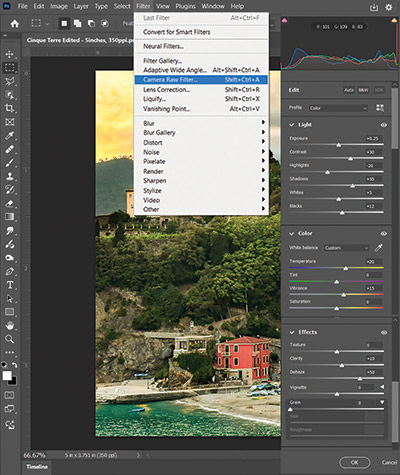
    I use some of the filter adjustments more often than others. For tackling the blue-haze problem, one adjustment is indispensable: Dehaze. This adjustment instantly removes most of the haze and does so without causing a lot of negative side effects. To find this adjustment, go to Filter > Camera Raw Filter (figure C) under the Effects submenu. Like the other adjustments in this filter, it has a slider to control the amount of the effect in both a positive and negative direction.

    I mentioned there are not many side effects from this adjustment, but there are some. When using the Dehaze adjustment to combat the haze, it tends to darken the photo, sometimes too much. Fortunately, the adjustments you need to counter this effect (Exposure, among others) are also in this dialogue box.

    Below are all the adjustments and the settings used to remove the blue haze from this photo and improve the overall image, along with a description of their effects.

    Dehaze +50
    Controls atmospheric haze. This is the first setting that I use to remove the blue haze.
    Exposure +5
    Controls overall brightness (and counters the Dehaze adjustment). A little of this adjustment goes a long way. Be careful not to overexpose your photo.

    Contrast +30
    Controls how much separation there is between the dark and light areas of an image.

    Highlights –20
    Targets brighter areas of the image. By lowering this adjustment, details can be recovered from the very light areas.

    Shadows +35
    Adjusts the darker areas of the image. Moving the slider in the positive brings out details from the shadows.

    Figure D
    Figure E

    Figure E

    Whites +5
    Specifically targets the brightest tones. Increases high-end brightness or can recover details in blown-out white areas of the image.

    Blacks +12
    Targets the darkest tones. Reveals details in the shadows or darkens and adds more contrast.

    Temperature +20
    Adjusts the white balance from cool to warm and is very useful to counter the blue cast created from the blue atmospheric haze.

    Vibrance +15
    Adjusts the intensity of the colors. This is like the Saturation adjustment, but its effects are much more subtle.

    Clarity +10
    Controls midtone contrast, texture, and sharpness. This will help clear the fogginess of the blue haze.

    Keep in mind that these settings won’t work for all photos, and the results are subjective. Some experimentation will be needed to achieve the desired effect. And, while the Camera Raw Filter is a super-useful tool, its adjustments affect the image as a whole. The next set of steps allows for a more surgical approach to improvements.

    The Deep Dive: Overlay and Soft Light Blend Modes

    Even after applying the Camera Raw Filter, a significant amount of haze remains in the mountains in the background. The next set of steps—although a bit unconventional—are highly effective tools and techniques for addressing challenges in specific areas of a photo.

    What Are Blend Modes?

    Blend Modes control how two layers—the one beneath and the one directly above—interact with each other. They determine how hues and tones blend together based on mathematical formulas. Blend Modes are often used to enhance contrast, combine textures, adjust lighting, or create artistic effects. Overlay and Soft Light belong to the Contrast category of Blend Modes.

    Both Overlay and Soft Light Blend Modes add contrast, but Soft Light is more subtle, while Overlay creates a more dramatic effect. Because Blend Modes are applied on separate layers, they are nondestructive and do not alter the original image.

    When a Blend Mode is used with a desaturated image (only gray tones) above the original photo, the hues will not change—only the tint and shade of the original color will change visually. Grays at 50% value will have no effect at all. Grays with a value less than 50% will lighten, and gray values above 50% will darken.

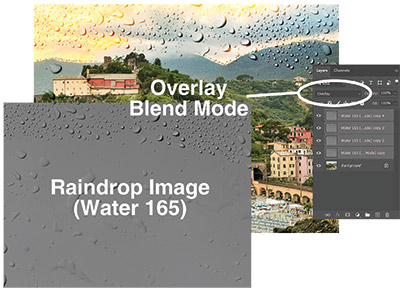
    To best illustrate what these Blend Modes can do, see figure D. Here, a grayscale image composed of raindrops has been added to the layer above the photo and set to Overlay at 100% opacity. That Blend Mode layer was then duplicated several times to magnify the effect (figure E).

    Note: The raindrops image file, called Water 165, is a free download from texturelabs.org.

    Figure F
    Figure G

    To target and fix specific areas of the image, the Brush tool—set to either white or black—can be used to paint over challenging spots (such as the furthest mountains in the background) to add contrast and clarity and further reduce the blue haze.

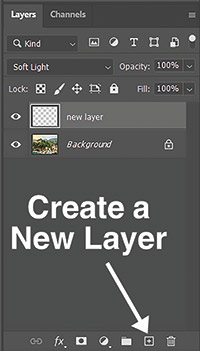
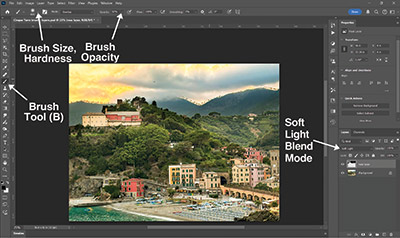
    To do this, create a new layer above the original by clicking the Create a New Layer button, (figure F) or use the shortcut Ctrl+Shift+N or Cmd+Shift+N on a Mac. Select the paint brush from the Tools panel (B) and set the Hardness slider to 0% and the size appropriate to the area being fixed. Change the paint color to black (for contrast), and set the new layer to either Overlay or Soft Light mode (figure G). Start clicking and dragging with the Brush Tool (B) in the new layer over the foggy mountains. The change will be immediate and satisfying, especially with the amount of control that these tools have.

    Adjust the Brush opacity as needed (I started with a value below 50%) and fine-tune the overall opacity of the Blend Mode layer for a subtler effect.

    Fixing photos doesn’t require years of Photoshop experience—just a willingness to experiment. The combination of the Camera Raw Filter and Blend Modes offers easy, broad fixes and precise control, allowing for mitigation of the atmospheric haze and other common image issues. Each photo will call for different settings, but these techniques provide a solid foundation for enhancing your images. In time, turning hazy snapshots into impactful images will be a breeze.

    Shon Roti is the owner of 9th Street Designs. Shon has more than 25 years of experience as a production artist, graphic designer, and instructor in the awards and promotional products industry. In 2014, ARA named him Speaker of the Year. Contact him at [email protected].

  • A Family Business That Grows with Its Customer Base

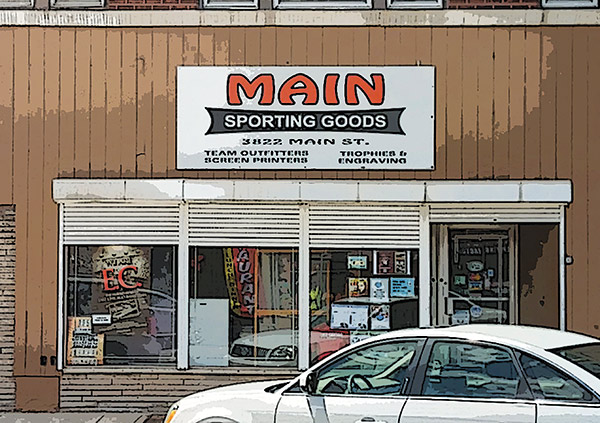
    When Bertram Radbel returned home to East Chicago, Indiana, after serving in the U.S. Army during World War II, he was looking for work. Despite having a journalism degree from the University of Illinois, his aunt and uncle, who owned Main Auto Supply, encouraged him to open his own retail store on the same street since the area was growing.

    By Shelley Widhalm

    (Originally printed in the September/October 2025 issue of Insights.)

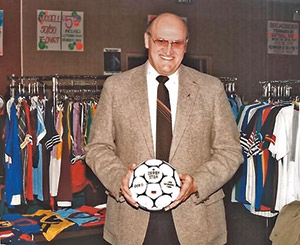
    “He was very athletic growing up, so sporting goods made sense to him,” says Diane Hudacin, one of Bertram’s three children and a current co-owner of the company with her brother Michael Radbel. “Since it was on Main Street, it became Main Sporting Goods. My dad didn’t think too hard about that.”

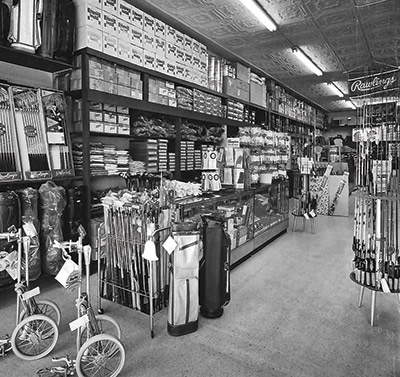
    Main Sporting Goods opened its doors in 1946, outfitting athletes with uniforms and sports equipment and selling outdoor gear and even Christmas trees. The company’s products have shifted significantly over the years to keep up with the times.

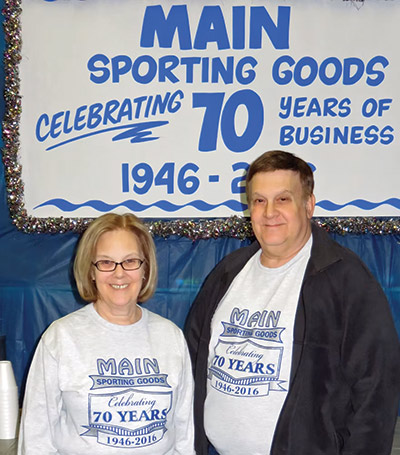
    “We had to adapt to whatever people were wanting to stay in business,” says Hudacin. “The greatest thing is we’re still here doing what we do. That says a lot for an 80-year-old business.”

    Bertram’s children all worked at Main Sporting Goods during their formative years—in high school and during breaks from college. Today, Hudacin is the president, and Michael Radbel is the vice president.

    Keeping Up with the Times

    The oldest of the Radbel children, Neal Radbel, decided to add awards to Main Sporting Goods in the late 1960s.

    “[Neal] was instrumental in bringing in trophies and a lot of business to us. He expanded the market quite a bit,” Hudacin says.

    Michael Radbel joined the team full- time in 1990. In the early 2000s, Neal passed away, and Hudacin—the youngest of the three—came on board full-time. Michael Radbel and Hudacin took over ownership of the business a few years later when their dad died.

    Over time the customer base continued to evolve, seeking less gear and fewer trophies. In the early 2000s, the team expanded into promotional products, selling tumblers, mugs, coasters, clocks, and sunglasses.

    Co-owners Diane Hudacin and Mike Radbel

    “As things change and buyers change and what they’re looking for changes, we have to keep up,” Hudacin says. “Customers were buying fewer trophies and awards, so we added promotional products to what we do.”

    Today, the business has two engraving machines, two sublimation machines, three heat presses, a screen printing machine, and a dryer to dry the ink from screen printing. The only service they outsource is laser engraving. Screen printing is done on garments like T-shirts, sweatshirts, sweatpants, jackets, and hats. Although trophies were not as in demand in the early 2000s, the trend has come back around in a big way.

    “Recently, we expanded into multicolor options because they are becoming popular,” says Hudacin. “It’s provided a whole new array of things we can do. It’s amazing what’s out there.”

    To better serve multicolor requests, the business expanded into sublimation for garments and plaques.

    Going Above and Beyond

    When asked what the secret is to sustaining 80 years in business, Hudacin says they provide very good service and important expertise.

    “We stand out because we provide very good service, and we know what we’re doing,” Hudacin says. “We can guide them into what they’re looking for, and they trust us. Our longevity and our service really stand out.”

    They’re known for going above and beyond for their customers, which has led to a strong base of repeat business and new clients discovering them through word of mouth.

    “We follow up and make sure everything is to [the customer’s] liking,” Hudacin says. “We show a lot of respect. People like that and can feel it. I like when they leave and they are happy,” Hudacin says. “When they’re happy, we’re happy.”

    That desire to see people happy also extends to their staff. Their dad started out with a couple of part-time employees. Today, Main Sporting Goods has around 15 on staff, including a few family members. The company proudly touts that they are family owned and operated, which is true, but they also consider all their employees family.

    “Most have been here a very long time, some 35, 40 years,” Hudacin says. “We spend more time together than with our own families.”

    This includes one of the store managers, William Mitchell, who has been at Main Sporting Goods for 46 years. He started as a senior in high school, looking for a job to make money so he could go to prom. Mitchell says his favorite part about working in this industry is meeting people and creating items that bring joy and happiness.

    “The customers are really what I like about it,” he says.

    The same goes for Hudacin.

    “Sometimes it’s a challenge because they don’t know what they want,” Hudacin says. “They trust us, and we don’t take advantage of that trust.”

    Continuing the Family Legacy

    For those entering the personalization industry, Hudacin recommends focusing on the customers as a primary objective.

    Main Sporting Goods furthers that customer-first approach through its membership in the APA. They joined the association nearly 50 years ago.

    “What I like most about the APA is how they introduce you to new products and the shows and the people that you meet there who are from other states and countries,” Mitchell says. “We try to go to shows every year.”

    Mitchell likes to see new products and share ideas when he’s at APA’s trade shows and expos.

    “It’s a lot of learning,” Hudacin says. “They help you get pricing and products.”

    Within the next five years, Hudacin and Radbel plan to retire. They will leave the business to Michael Radbel’s son, Ryan, who is a manager at the store.

    Hudacin is proud of the family legacy of Main Sporting Goods and hopes to see it continue for years to come.

    “My dad started this business when I was very little. It has supported many families over the years,” she says. “We will keep doing it as long as our customers keep coming, as long as people need us.”

    Shelley Widhalm is a freelance writer and editor and founder of Shell’s Ink Services, a writing-and-editing service based in Loveland, Colorado. She has more than 15 years of experience in communications and holds a master of arts degree in English from Colorado State University. She can be reached at shellsinkservices.com or [email protected].